Delivery App Listing Audit
Summary Highlights
Here's a concise single-sentence version: 86% of restaurants have delivery listing errors they don't know about—run this 7-point audit on your DoorDash, Uber Eats, and Grubhub pages to uncover and fix what's silently killing conversions.
Delivery App Listing Audit : The 7 Silent Errors That Are Costing You Orders Right Now
What Is a Delivery App Listing Audit?
A delivery app listing audit is a systematic check of everything a customer sees on your DoorDash, Uber Eats, and Grubhub pages before they place an order - your hours, prices, photos, modifier options, item descriptions, and category structure. Unlike a menu engineering exercise (which decides what to sell), a listing audit finds configuration errors that are already live and silently suppressing conversions.
Your stores are online. Orders are coming in. Everything looks fine from the inside. But "online" doesn't mean "optimised" - and for most multi-unit operators, the gap between those two things is costing real revenue.
Research cited by order accuracy platform Checkmate found that 86% of restaurant operators have a mismatch between their internal menu and what customers see on delivery platforms. That's not 86% of poorly-run restaurants. It's nearly the entire industry, because delivery platforms don't automatically sync every change you make in your POS or back office. Drift is the default.
The problem is that most of these errors are invisible until you go looking. The customer who saw wrong hours and didn't order doesn't file a complaint - they just go somewhere else. The modifier that's charging $4 for something that should be free doesn't trigger a dispute - it just lowers your conversion rate and raises your abandoned-cart count.
This is your audit. Seven specific listing errors, how to find each one, and what to do about them.
Why Listing Errors Are Different From Other Delivery Problems
It's worth being precise about scope before diving in. This article is not about:
- Stores going offline (that's a downtime problem - a separate issue)
- Wrong items being packed (that's an order accuracy problem - a kitchen issue)
- Poor ratings dragging down your search rank (that's a quality problem - a different fix)
Listing errors are a different category. They exist in the static configuration of your delivery page - the setup layer that determines whether a customer who finds your restaurant actually completes an order. They are pre-purchase problems, not post-purchase ones.
This distinction matters for diagnosis. If your delivery traffic is holding but conversion is soft, the problem is almost certainly in this layer.
Why Multi-Unit Operators Have It Worse
A single-location operator who personally manages their delivery listings catches most of these errors by accident - they log in to run a promotion and notice their hours are wrong. At 20 locations, nobody is doing that. Changes get made at one location and not others. Menu updates pushed in November still haven't reached the Grubhub listing. The DoorDash page for Location 7 still shows a limited-time item that ended six months ago.
Multi-unit operators face three compounding problems:
- Changes made through one platform's merchant portal don't automatically propagate to the others
- Location-level listing management is typically delegated to store managers who have higher-priority tasks
- There's no central view across all platforms and locations that surfaces when listings have drifted
The result is that a 30-location brand might have 30 different versions of its DoorDash listing and another 30 variants on Uber Eats - all slightly wrong in different ways.
The 7 Listing Errors - And How to Find Them
Error 1: Wrong or Outdated Operating Hours
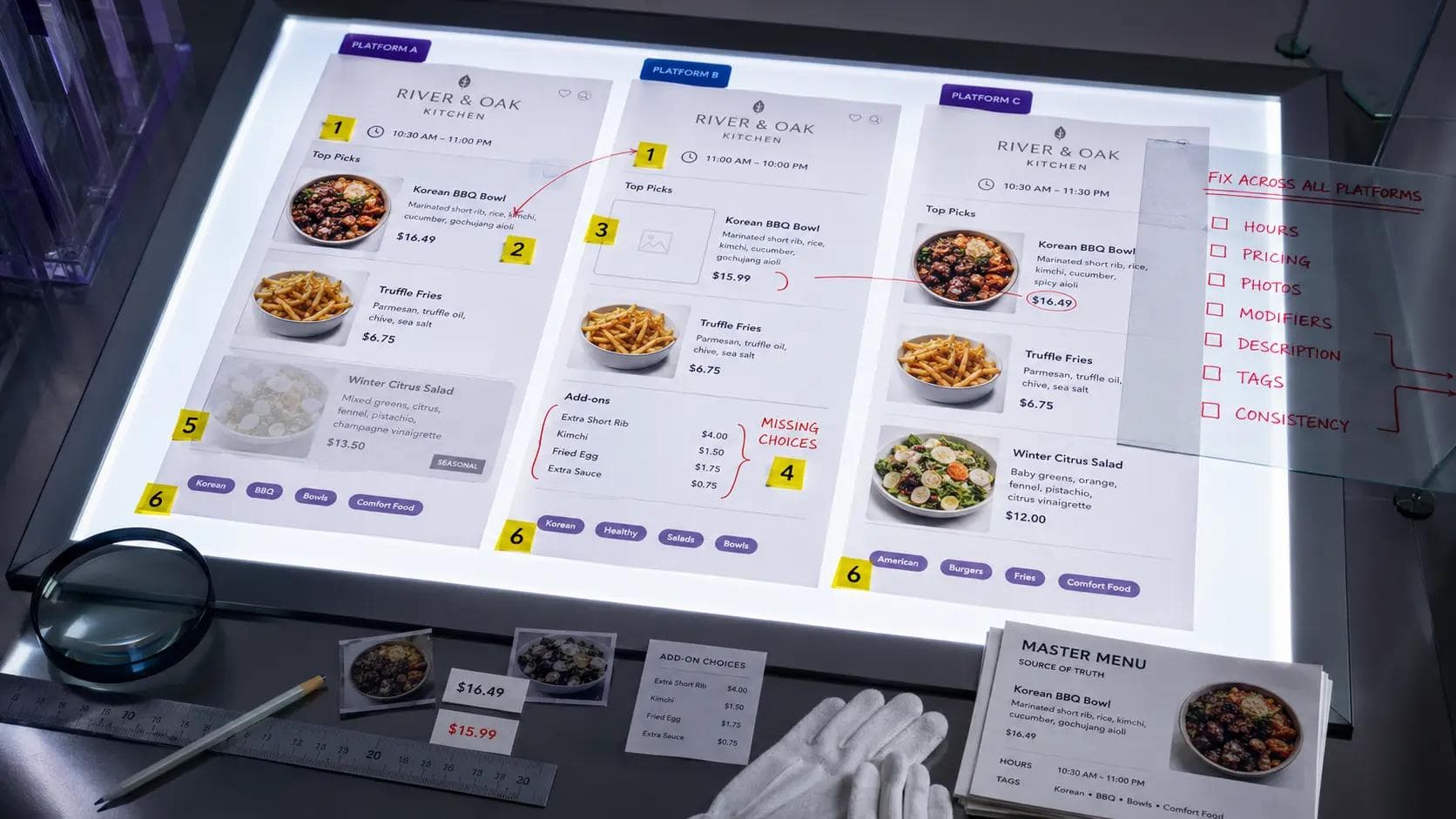
This is the most common listing error and the hardest to catch because your store's delivery hours and your actual open hours are managed separately on each platform. If you changed your kitchen close time from 10pm to 9pm and updated it in your POS, your DoorDash listing didn't automatically update.
The visible symptom: customers see your store as "open" or "closed" when the opposite is true. A store appearing closed during peak hours loses every order from every customer who checked and moved on. A store appearing open past kitchen close generates orders that get cancelled - which damages your cancellation rate and your platform ranking.
How to find it: Log into each platform's merchant portal and check the hours setting directly. Do not rely on your POS data or a third-party dashboard - check the native platform display. Do this for every location, across all three platforms, every time you change operating hours.
Error 2: Price Drift Across Platforms
Price drift happens when you update pricing on one platform but not the others. A burger that costs $13.99 on DoorDash but $12.99 on Uber Eats isn't a deliberate pricing strategy - it's an error. And it cuts both ways: the higher price on one platform quietly suppresses conversions; the lower price on another is margin you're leaving on the table.
For multi-unit operators, price drift compounds. If 15 locations each made independent pricing changes over the last year across three platforms, you potentially have 45 different price schedules with no systematic view of which are correct.
How to find it: Export your menu pricing from each platform and run a comparison against your master pricing sheet. Look for any item where the price differs between platforms or differs from your intended delivery price. This takes time but only needs to be done quarterly - or when you run a menu pricing update.
Error 3: Broken or Outdated Modifier Options
Modifiers are the add-ons, customisations, and upcharges customers see when they tap an item - "Add bacon: +$2.00", "Choose your sauce: Ranch / Honey Mustard / BBQ", "Remove onions: free". These are configured manually on each platform and are a frequent source of silent errors.
Common modifier problems include:
- An 86'd item is still available as a modifier option - customer selects it, kitchen is out of it, order gets modified or cancelled
- A modifier that should be free is set to a dollar amount - inflates the perceived order cost and causes cart abandonment
- A required modifier has only one selectable option - frustrating to customers and sometimes blocks order completion
- Old modifier groups from a previous LTO are still attached to items after the promotion ended
How to find it: Go through your top 10 items by order volume on each platform and click through their modifier options exactly as a customer would. Check pricing, availability, and whether the selections make sense. Pay specific attention to any modifiers added during an LTO that you may have forgotten to remove.
Error 4: Incomplete Photo Coverage
Delivery platforms surface photo counts as part of listing quality signals, and customers are meaningfully more likely to order items they can see. An item with a strong photo will consistently outperform the same item without one - which means gaps in photo coverage are a conversion problem, not just an aesthetic one.
For multi-unit operators, photo coverage often varies by platform: the brand's DoorDash listing might have photos on 80% of items because that's where they invested time initially, while the Grubhub listing has photos on 30% because it was set up later and the photos were never migrated.
How to find it: Browse your listing as a customer on each platform. Count the items without photos. Identify your top 20 highest-volume items and confirm every single one has a photo. Those items drive the most revenue - they need to look the part.
Error 5: Stale Item Descriptions
Item descriptions go stale in predictable ways: a seasonal item gets swapped but the description still references the old version; an allergen changes in the recipe but the listing still says it's nut-free; a promo callout ("Try our new crispy chicken!") is still live two years after launch.
Stale descriptions matter for two reasons. First, they can generate legitimate disputes - a customer ordered based on an allergen claim that's no longer accurate. Second, they erode trust for customers who notice the discrepancy between what the description says and what arrives. That eroded trust directly affects reviews.
How to find it: Do a quarterly review of descriptions for any item that has changed - recipe, packaging, seasonal ingredients, price. Focus on allergen language especially. Any description referencing a promotion or seasonal angle should have a review date attached so it doesn't outlive its relevance.
Error 6: Wrong Cuisine Category or Search Tags
On delivery platforms, your cuisine category and search tags affect how you appear in browse and search results. A Thai restaurant miscategorised as "Asian" will appear in broader, more competitive searches and miss customers specifically filtering for Thai. A burger brand tagged only under "American" might miss the "Burgers" filter where the highest-intent customers are looking.
This error is set-and-forgotten by most operators - configured at onboarding and never revisited. Meanwhile, platforms occasionally update their category taxonomy, which can orphan your original tags.
How to find it: Log into each platform and check your cuisine category and any available tags. Search for your own restaurant using category filters on the customer-facing app and verify you appear where you expect to. Compare your category settings across platforms - they should be consistent.
Error 7: Cross-Platform Inconsistency as a Category
This is the meta-error: the state where your listings on DoorDash, Uber Eats, and Grubhub have drifted away from each other, so no single platform reflects your actual current menu. It's not one error - it's the accumulated result of uncoordinated updates over time.
Customers who order from you on different platforms shouldn't see a meaningfully different restaurant. If your DoorDash listing has 48 items and your Grubhub listing has 61 items, that's a signal that one of them is wrong - either items were added somewhere and not everywhere, or items were removed somewhere and not everywhere.
How to find it: Export your full item list from each platform and put them side by side. Compare item names, item counts, and category structure. Any meaningful difference between platforms is worth investigating.
Quick-scan checklist
□ Hours match on all three platforms and reflect current operating schedule
□ Prices are consistent across all platforms (or intentional differences are documented)
□ Top 10 items by volume have all modifiers checked - pricing, availability, logic
□ All top-20 items by volume have photos
□ Descriptions for changed items have been updated in the last 90 days
□ Cuisine category and tags are correct and consistent across platforms
□ Item counts are within 5% across platforms (or differences are deliberate)
How Often Should You Run This Audit?
The trigger-based answer is simpler than the calendar-based one. Run a full audit whenever:
- You make a menu price change - check all three platforms within 48 hours
- You add or remove a permanent menu item - update all platforms the same day
- You run or end an LTO - modifier cleanup needs to happen the day the promo ends
- A location changes its operating hours - update every platform before the change takes effect
- You onboard a new platform - port your current, clean menu, not your original onboarding menu
For multi-unit operators who can't realistically self-audit across 20+ locations, the more sustainable approach is to build a centralised data view that flags platform-to-platform inconsistencies automatically - rather than relying on individual location managers to remember to check.
What Voosh Surfaces in This Workflow
Most of the errors above are invisible until you look for them. The problem at scale is that "looking for them" across 30 locations and three platforms means 90 separate logins - manually, every time you run a pricing update.
Voosh aggregates operational and performance data from DoorDash, Uber Eats, and Grubhub into a single dashboard. Where listing errors are showing up in your numbers - a location with anomalously low conversion, a platform with unexpectedly high dispute rates, a customer review pattern mentioning unavailable items - Voosh's analytics and review monitoring surfaces those signals in one place. That's the visibility layer that makes these audits actionable at scale rather than a quarterly fire drill.
How Voosh connects to the audit workflow
• Analytics & Insights: Spot conversion drops and sales anomalies by location and platform that often point to listing issues
• Review Manager: Surfaces customer feedback mentioning wrong items, unavailable options, or pricing surprises - early warning signs of listing errors
• Centralised dashboard: See all three platforms' performance side-by-side instead of logging into each separately
• Dispute Manager: Catches charge errors and disputes that stem downstream from modifier or pricing misconfiguration
The Cost of Doing Nothing
A listing error is a quiet leak. It doesn't show up as a dramatic sales drop or a viral complaint. It shows up as a slightly lower click-to-order rate, a few extra disputes per week, a handful of 2-star reviews mentioning "they charged me wrong" - numbers that individually look like noise.
At 20 locations, noise adds up. If each location is losing two orders a day to listing errors - wrong hours, a broken modifier, a price that doesn't match - that's 40 orders a day, roughly 14,600 orders a year. At a $30 average order value, that's $438,000 in revenue that left through a door that should have been closed.
The audit takes a few hours. The fix for most errors takes minutes. The math on doing it is straightforward.
Voosh connects to DoorDash, Uber Eats, and Grubhub and surfaces the analytics, review trends, and performance signals that show you where listing errors are already costing you - across every location, in one dashboard.