Dispute resolution and reconciliation
Summary Highlights
This article explains Voosh's Dispute Manager and Finance Reconciliation features, along with steps to simplify and optimize your restaurant's financial management.
Dispute Manager
Protecting Your Restaurant's Bottom Line
This section covers Voosh's Dispute Manager, detailing how it helps restaurants monitor and resolve disputes efficiently.
What Is the Dispute Manager?
Voosh's Dispute Manager centralizes all dispute-related tasks into one streamlined dashboard. It automates the dispute process for orders from platforms like Uber Eats, DoorDash, and Grubhub, allowing you to track, submit, and resolve disputes without the back-and-forth hassle. Instead of manual intervention, Voosh automates everything, saving you time and helping you recover lost revenue faster.
In case a dispute arises, here's what Voosh can help with:
- Automated Submissions: Once an issue is flagged, Voosh automatically submits the dispute across all relevant platforms, ensuring timely filings and preventing missed deadlines.
- Real-Time Monitoring: You can see the progress of each dispute in real-time, with updates on recovery amounts and issues resolved.
- Recover Lost Revenue: By automating disputes, Voosh helps recover revenue that would have otherwise been lost due to discrepancies, cancellations, or refunds not being properly handled.
Why Is Dispute Management Important?
Disputes can drain profits and tarnish a restaurant's reputation if left unresolved. The faster disputes are handled, the quicker you can recover revenue and prevent future issues. Voosh's Dispute Manager ensures that even the most minor discrepancies are addressed, keeping your financials on track and protecting your restaurant from unnecessary losses.
Understanding the Dispute Dashboard
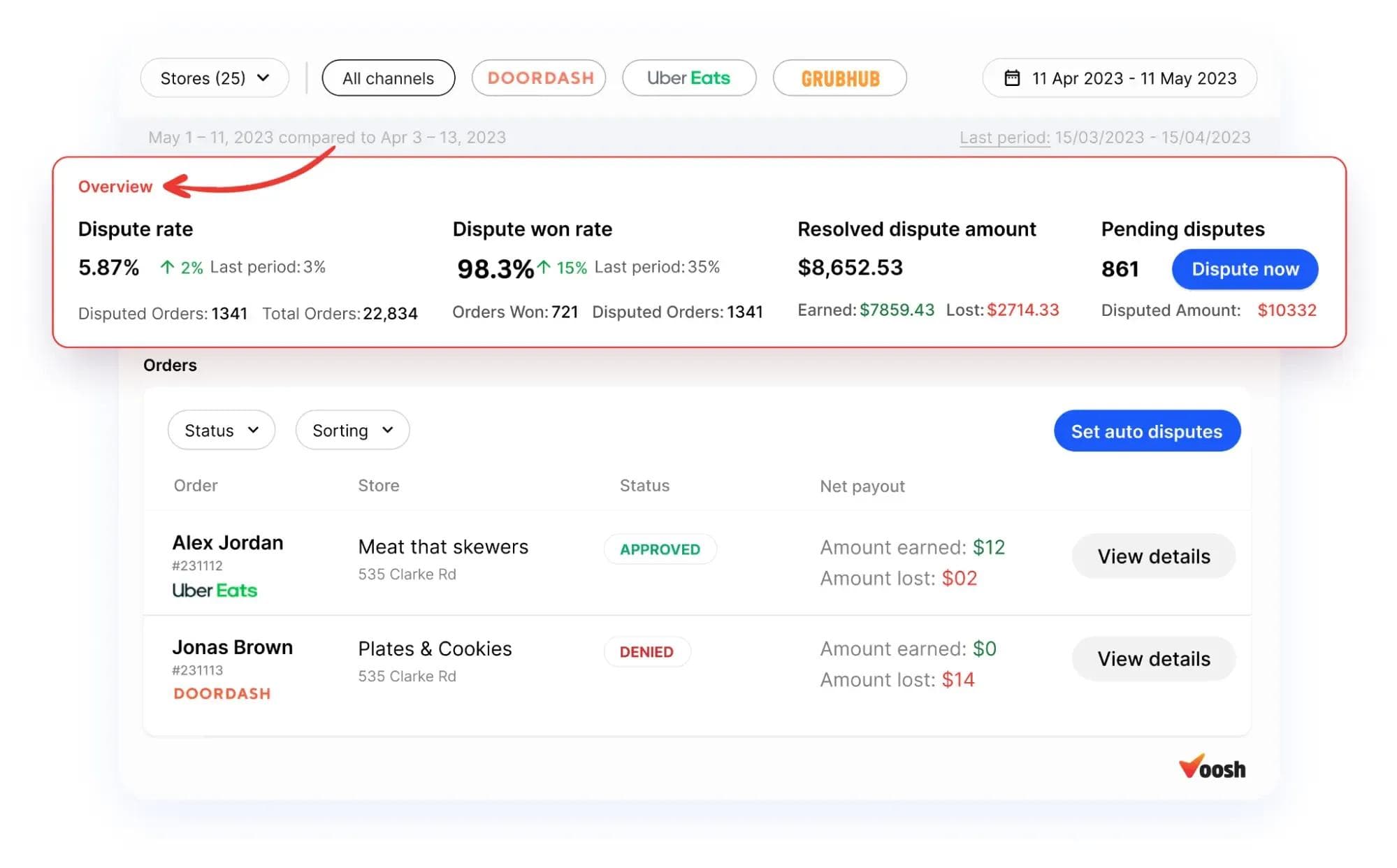
- Dispute Rate & Win Rate :

The dispute rate represents the percentage of orders disputed, while the dispute win rate shows the percentage of successfully won disputes. For example, if your dispute win rate is 95.22% (as shown in the image), this means you've recovered over 95% of the disputed amounts.
- Automating Disputes :

Voosh makes it easy to automate disputes across platforms like DoorDash and Uber Eats. The "Manage Auto Disputes" option allows you to set up automated systems for handling disputes. Once enabled, Voosh will automatically file disputes within the specified platform's guidelines, significantly reducing the manual effort involved.
- Setting Up Auto Dispute :
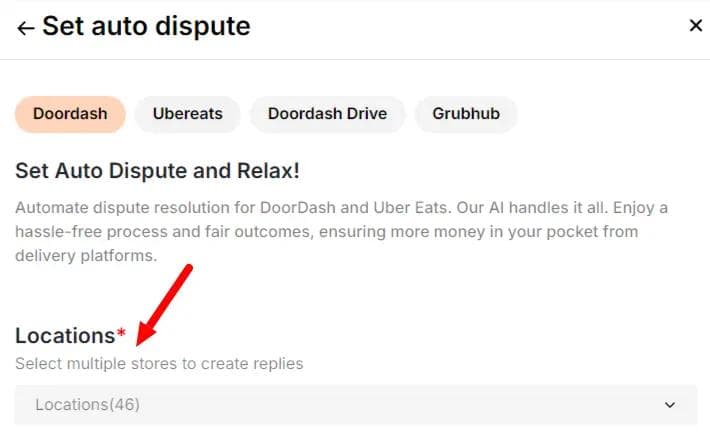
In the Auto Dispute section, you can select the specific platforms (DoorDash, Uber Eats, etc.) and locations to set up automatic replies for disputes. For restaurants managing multiple locations, this feature ensures each dispute is handled efficiently across all sites.
How to Automate Dispute Management
With a single click, Voosh automates the dispute resolution process for platforms like DoorDash, Uber Eats, GrubHub, and more, as shown in the image above. The system ensures disputes are filed promptly and accurately, saving you hours of manual work and boosting revenue recovery.
Best Practices for Dispute Management
To maximize your financial recovery, follow these key practices:
- Prioritize High-Value Disputes: Start with large orders to recover more significant amounts of revenue faster.
- Timely Submission: Platforms like Uber Eats and DoorDash have tight windows for submitting disputes (30 days for Uber Eats, 14 for DoorDash). Submit disputes promptly to avoid missing out on recoverable revenue.
- Comprehensive Evidence: Provide clear, accurate evidence for each dispute to increase the likelihood of a favorable resolution.
- Flag Suspicious Customers: Be aware of potential fraudulent claims and flag them to avoid further losses.
Example: Dispute Scenario
Let's say a restaurant receives a $150 chargeback for a canceled order on DoorDash. Using Voosh's Dispute Manager, the restaurant pulls all relevant transaction details, submits the dispute, and tracks the progress in real time. Without manual intervention, the restaurant is able to resolve the dispute and recover the lost revenue quickly.
Financial Reconciliation
Simplifying Financial Reconciliation
This section explains how Voosh helps restaurants reconcile financial data between POS systems and off-premise platforms.
What Is Financial Reconciliation?
Financial reconciliation involves comparing actual payouts with estimated payouts, as well as aligning sales data from your POS system with external platforms (like Uber Eats and DoorDash). Voosh's finance reconciliation tool makes this process simple by providing an intuitive dashboard that highlights any discrepancies in real-time, so you know exactly where your money is going.
In case of discrepancies, here's how Voosh helps:
- Estimated vs. Actual Payouts: Compare what you expected to receive versus what was deposited into your account. Voosh pinpoints the differences, whether due to fees, commissions, or adjustments, helping you resolve them quickly.
- POS vs. Off-Premise Reconciliation: Voosh matches your POS data with off-premise platforms to ensure all sales are accounted for, eliminating the risk of revenue loss due to mismatched data.
- Detailed Transaction Insights: Get a breakdown of every transaction, including fees, refunds, and marketing costs. This transparency allows you to manage your finances with confidence.
Understanding the Financial Reconciliation Dashboard
Payment Difference :
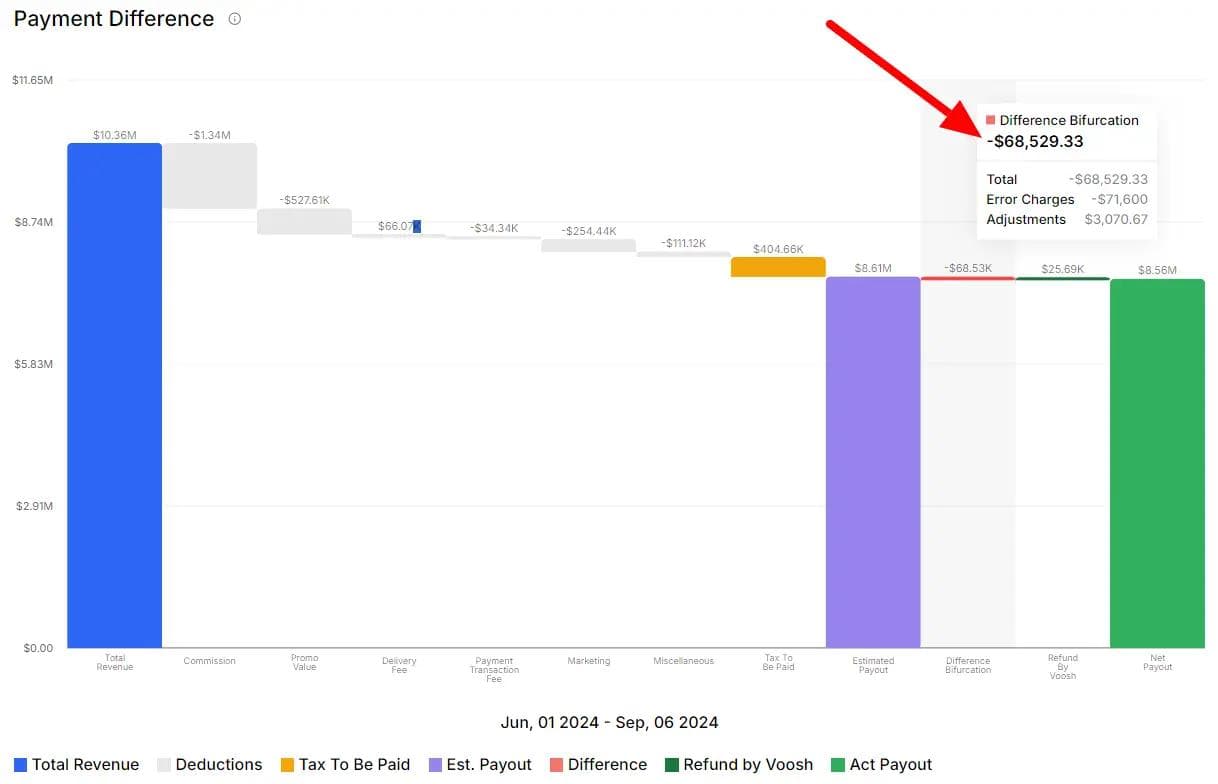
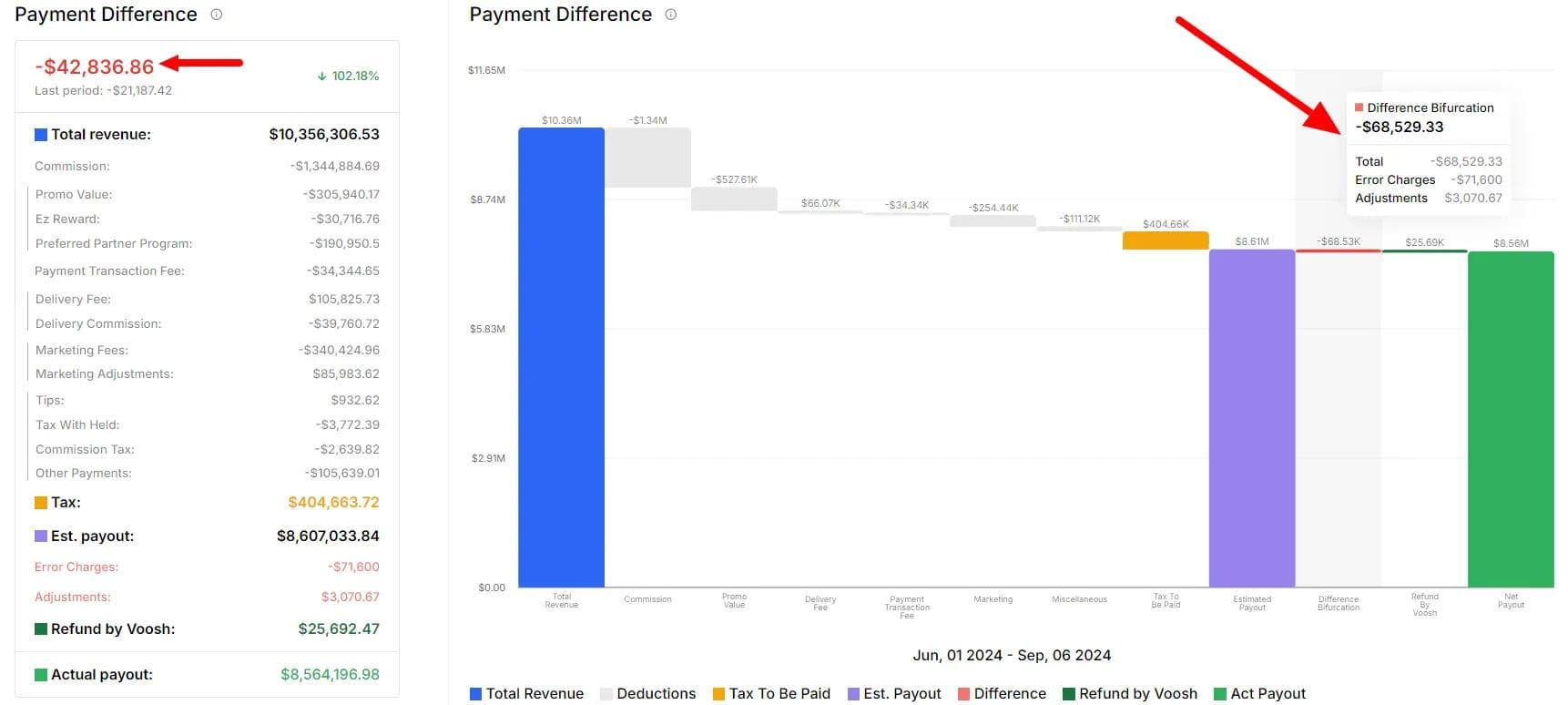
The "Payment Difference" section uses a waterfall chart to visually break down how various deductions and adjustments impact the total revenue, showing why there is a difference between the estimated payout and the actual payout.
- Total Revenue: This is the gross revenue generated before any deductions, representing all sales processed by your restaurant, In this case, it's $10.36M.
- Deductions (in gray): These represent various fees that reduce your gross revenue:
- Commission: The platform's service fee for processing orders (e.g., DoorDash, Uber Eats). In this case, it's -$1.34M.
- Promo Value: Discounts or promotions applied to customer orders, shown here as -$527.61K.
- Payment Transaction Fees: These cover the fees for processing payments through different platforms, -$34K.
- Delivery Fees and Commission: Fees associated with delivery services and additional commissions, $66K respectively.
- Marketing Fees/Adjustments: Charges for any marketing services or adjustments made by the platform.
- Other Adjustments (in gold): Tax amounts to be paid, such as VAT or sales tax, which are usually deducted before final payout. In this example, the tax to be paid is $404K.
- Estimated Payout ($8.6M, in purple): After all deductions, this is the payout you expect to receive based on the total revenue and the various fees applied.
- Difference Bifurcation (in red, -$68.53K): This segment indicates a discrepancy between the estimated payout and actual payout. It's important to review this section carefully, as it might reveal unexpected fees or errors in the platform’s calculations.
- Error Charges (-$71.6K): This indicates charges that were incorrectly applied.
- Adjustments (+$3K): Positive or negative adjustments that account for differences between platform calculations and your POS data.
- Refund by Voosh (in green, $25.69K): Voosh's system like dispute manager identifies and recovers amounts that were erroneously deducted, leading to recovered revenue for your restaurant.
- Actual Payout ($8.56M, in dark green): This is the final payout after deductions and adjustments. It represents the real amount deposited into your account.
POS vs Off-Premise Reconciliation:
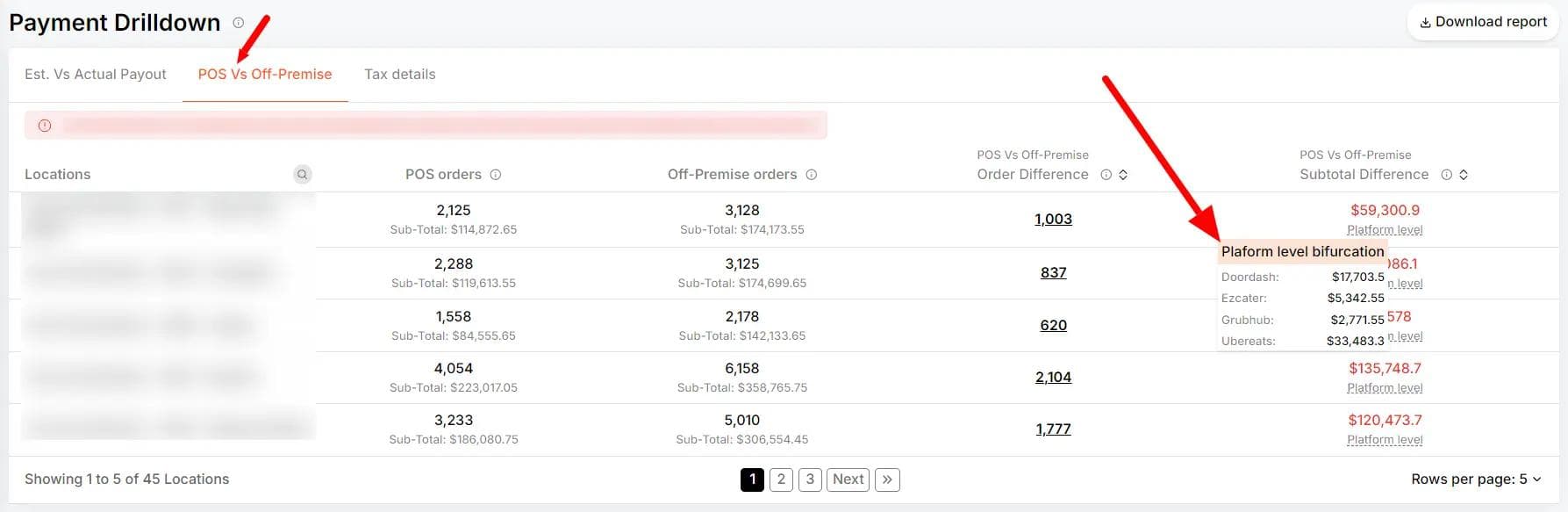
This part of the dashboard allows you to compare orders processed through your restaurant's POS system versus orders from off-premise platforms like Uber Eats, DoorDash, and Grubhub. The comparison helps to identify any discrepancies between the two systems.
- POS Orders: This shows the number of orders recorded through your restaurant's in-house POS system. For instance, if you have 2,125 POS orders totaling $114,872.65, this is the amount recorded on your internal system.
- Off-Premise Orders: This represents the number of orders and revenue generated from third-party platforms, such as Uber Eats or DoorDash. In the example, 3,128 off-premise orders brought in $174,173.55.
- Order Difference: The difference between POS and off-premise order numbers. A discrepancy (e.g., a difference of 1,003 orders) could indicate unaccounted sales, integration issues, or errors in reporting. You can break this down by platform to see which off-premise system is causing the variance. For example, DoorDash might show a $17,703.50 difference, while Uber Eats shows $33,483.30, indicating where to focus reconciliation efforts.
Example: Payout Discrepancy
A restaurant expects a payout of $1,500 from Uber Eats but receives only $1,350. Using Voosh's reconciliation dashboard, they identify that the missing $150 was due to commission and marketing fee deductions. With this insight, they can adjust future expectations and ensure that all deductions are legitimate.
Why Is Financial Reconciliation Important?
Without regular reconciliation, it's easy for discrepancies between your POS and off-premise sales to go unnoticed, leading to revenue leakage. Frequent reconciliation helps identify these issues early, so they can be corrected before they impact your bottom line. Voosh's reconciliation tool makes this process efficient and accurate, ensuring your financials are always in sync.
Conclusion
Dispute management and financial reconciliation are critical for maintaining your restaurant's profitability. By automating these processes with Voosh, you can ensure timely dispute resolutions and accurate financial tracking, allowing you to focus on serving great food while Voosh handles the behind-the-scenes work.