Data-Driven Restaurant Site Selection

Summary Highlights
Use location analytics to pick the best new restaurant site. Analyze foot traffic, demographics, and delivery data for expansion. Book a demo!
Data-Driven Restaurant Expansion: Finding Your Next Location
Opening your next restaurant location by gut feel is a risky game. Today, a smarter approach exists: leverage the data from third-party delivery apps. By mapping online orders and customer behavior, multi-unit operators can spot high-demand areas and tailor expansions accordingly. Instead of guesswork, you’ll use delivery data analytics to choose where to grow. This article breaks down how to turn delivery order data into a strategic expansion plan, step by step.
Why Data-Driven Expansion Beats Guesswork
Most restaurant owners rely on intuition when scouting new markets: “This neighborhood feels right,” or “My customers live around here.” But intuition can miss hidden opportunities. For example, one area may have low foot traffic but thousands of local takeout orders that you can capture. By analyzing real delivery app data, you stop relying on hunches. Delivery orders reveal actual customer demand down to the zip code. In fact, as the National Restaurant Association notes, U.S. restaurant sales are projected to hit $1.5 trillion by 2026. With stakes this high, expansion decisions should be based on data, not guesswork.
The Limits of Gut Feel in Location Planning
Choosing new locations without data can be costly. You might overestimate a trendy area or overlook a residential zone with heavy delivery demand. One competing analysis calls delivery data “the new premium location” factor – it “reveals where demand exists before a storefront ever opens”. In other words, why open next to a full restaurant if the untapped orders are elsewhere? Pulling data from DoorDash, Uber Eats, Grubhub, etc., turns those hidden patterns into a clear map.
Identifying High-Demand Areas with Delivery Data
The first step is to map your current delivery footprint. Use Voosh’s dashboards (or any data tool) to plot all delivery orders by address or ZIP code. Look for clusters of order volume. These order heatmaps immediately highlight “hot spots” where demand is highest.
- A neighborhood with no restaurant of your type might still be sending frequent orders to others – a sign of unmet demand.
- Pay attention to competitor origins: lots of orders coming from a suburb could mean locals would use your restaurant if it were closer.
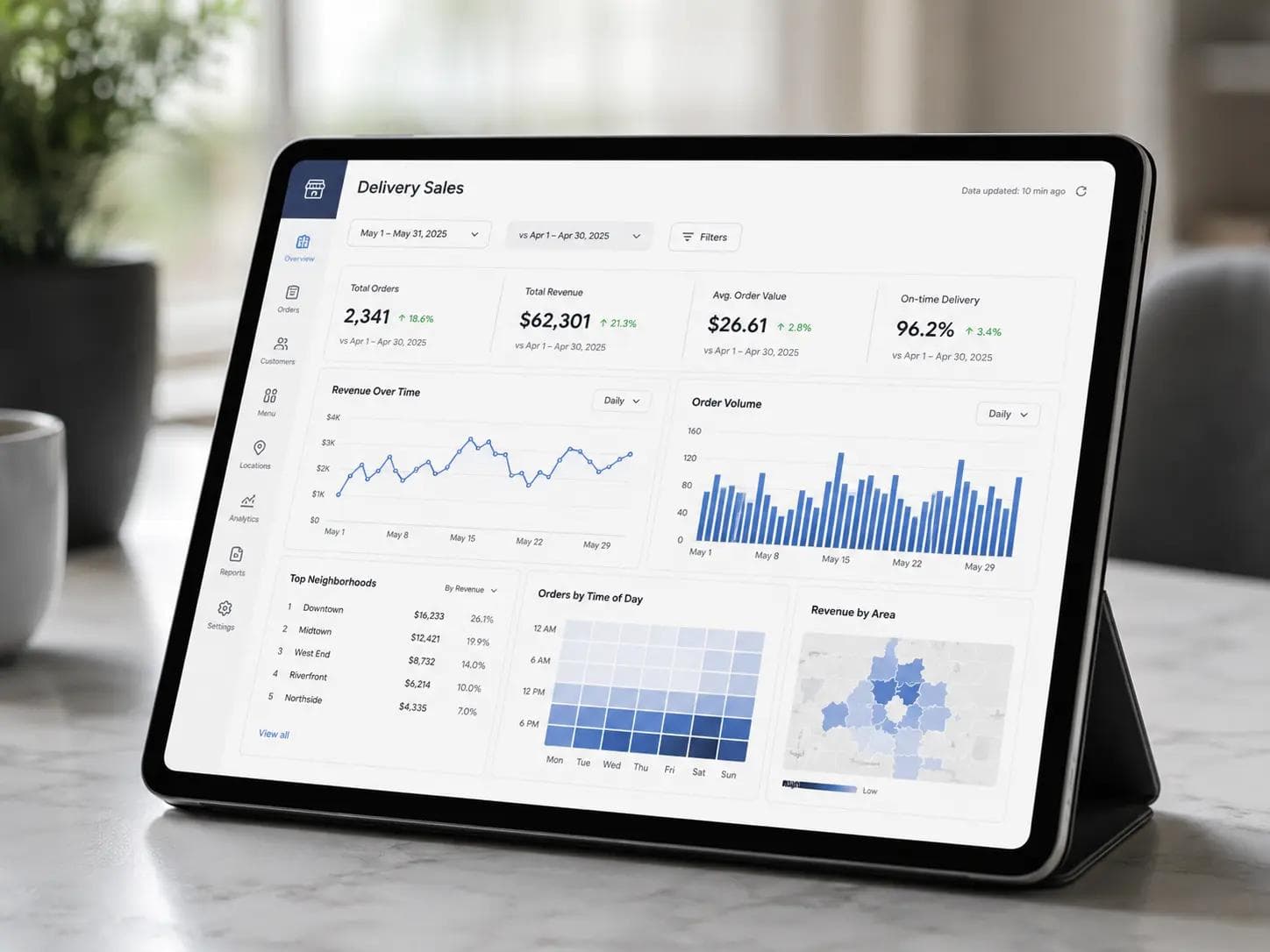
Above is an example of a unified delivery dashboard. You can see total orders, revenue trends, and top neighborhoods at a glance. This bird’s-eye view makes it easy to spot areas ripe for expansion. For instance, if the data shows 500 weekly orders within a 3-mile radius of an empty location, that’s a strong signal to investigate further.
Using Order Heatmaps to Spot Hotspots
CloudKitchens highlights this approach: by plotting delivery data on a map, operators “discover new hotspots” and can lease kitchens strategically. We’ll take that further – identify not just where people are ordering, but what they’re ordering there.
Comparing Zip Codes and Radii for Market Insights
Quantify demand by drawing trade-area radii around your top outlets. How many orders fall within each ring? Which zip codes or boroughs have the highest per-capita order rate? A simple comparison could reveal a suburb where your cuisine is disproportionately popular. Cross-check this with demographics (population, competing concepts). This method ensures you target the right city rather than randomly choosing a location.
Matching Your Menu and Marketing to New Markets
Finding a high-demand zone is only half the battle. You must ensure your menu and brand fit local tastes. Delivery data helps here too:
- Cuisine Gaps: Analyze which dish categories (pizza, sushi, burgers) are most ordered in the target area. If you sell burgers and the data shows a neighborhood orders mostly sushi and Mexican, you might pivot or add relevant items.
- Price Sensitivity: Check the average order value and popular order times. Lower AOV might mean value-conscious customers; consider combo deals there.
By tailoring your offering to the local demand, you increase the odds that the new location will thrive immediately.
Tailoring Your Offerings Based on Local Tastes
For example, if dinner orders dominate in a suburban ring, you might introduce family meal deals or “comfort food” specials for evenings. If brunch orders are heavy downtown, ensure you have a strong breakfast/lunch menu. Voosh’s analytics can show each menu item’s popularity by location. Promote the winners in that area and phase out underperformers to keep the kitchen efficient.
Testing Concepts with Virtual/Pop-Up Kitchens
Before committing to a full site, consider a pop-up or delivery-only (ghost) kitchen in the chosen zone. Voosh supports launching delivery cloud kitchens by integrating all delivery platforms. Run a limited menu and gather data: if orders spike even without a dine-in presence, that validates the market. If not, you’ve learned without heavy investment.
Scaling Operations: Kitchen Setup and Staff Planning
Once you’ve picked a location, plan operations around the data:
Choosing the Right Kitchen Model (Ghost vs. Full)
If orders predictably high but venue size tight, a delivery-only kitchen could be ideal. No dine-in costs, but you still need a professional kitchen. Data might show 70% of demand is pickup or drive-thru; a carry-out focused model might work best.
Sizing Your Team to Match Delivery Peaks
Analyze the time-of-day patterns. Does lunchtime or late-night deliver more? Schedule staff accordingly. CloudKitchens suggests that data-driven staffing avoids wasted labor. For instance, if 80% of new area orders come between 6-9pm, you can start with a lean morning crew and beef up at peak dinner.
How Voosh’s Platform Makes Expansion Smarter
Voosh’s third-party delivery intelligence is built for exactly this. With Voosh, all your apps feed into one dashboard. You can instantly see new-area metrics alongside your existing stores. Key features for expansion include:
- Unified Dashboard: See order volume, avg. delivery distance, and revenue for each prospective site as easily as you check your current locations.
- Custom Alerts: Set geo‑alerts for target zones. For example, notify managers when orders in a new postal code exceed a threshold, indicating strong traction.
- Integration: Voosh integrates with POS and accounting, so you can compare delivery projections with real-world financials for a proposed site.
By centralizing data, Voosh helps replicate what’s working. If Store A’s menu mix sells 3:1 burgers to fries, you can launch Store B with the same ratios. Workflows like promotions or dispute policies can be rolled out brand‑wide, ensuring consistency as you grow.
Conclusion : Plan Your Next Move with Confidence
Expanding into a new area no longer has to be a shot in the dark. By mapping delivery orders, analyzing menu performance, and using a unified platform like Voosh, you turn expansion into a data-driven process. The result: new locations are more likely to succeed from day one.
Ready to grow smart? Book a demo with Voosh and see how our platform uses real delivery data to guide your next expansion. Your restaurant’s next thriving location could be waiting on the map.