Third Party Delivery Reconciliation Playbook
Summary Highlights
The article explains how third-party delivery reconciliation ensures restaurants get paid accurately by matching delivery-app orders with POS data, payout reports and bank deposits. It highlights common challenges like complex fees, promos, refunds and inconsistent data. It also outlines a 30-day plan to organize systems, reconcile payouts, link POS and banking data, and set up workflows for disputes and downtime. Tools like Voosh.ai automate this process and improve financial accuracy.
If you run a restaurant group today, there's a good chance your P&L lives and dies by third party delivery.
You've got payouts hitting the bank, CSVs from multiple apps, reports from your POS, and a finance team trying to explain why the numbers never quite match. Operators just want to know one thing: are we actually getting paid what we earned?
That's what this playbook is for.
Over the next few minutes, we'll walk through a practical, 30-day plan to get control of third party delivery reconciliation - not just in your accounting system, but across disputes, reviews, uptime, and promotions - using the tools you have today and automation where it makes sense.
What is third party delivery reconciliation, really?
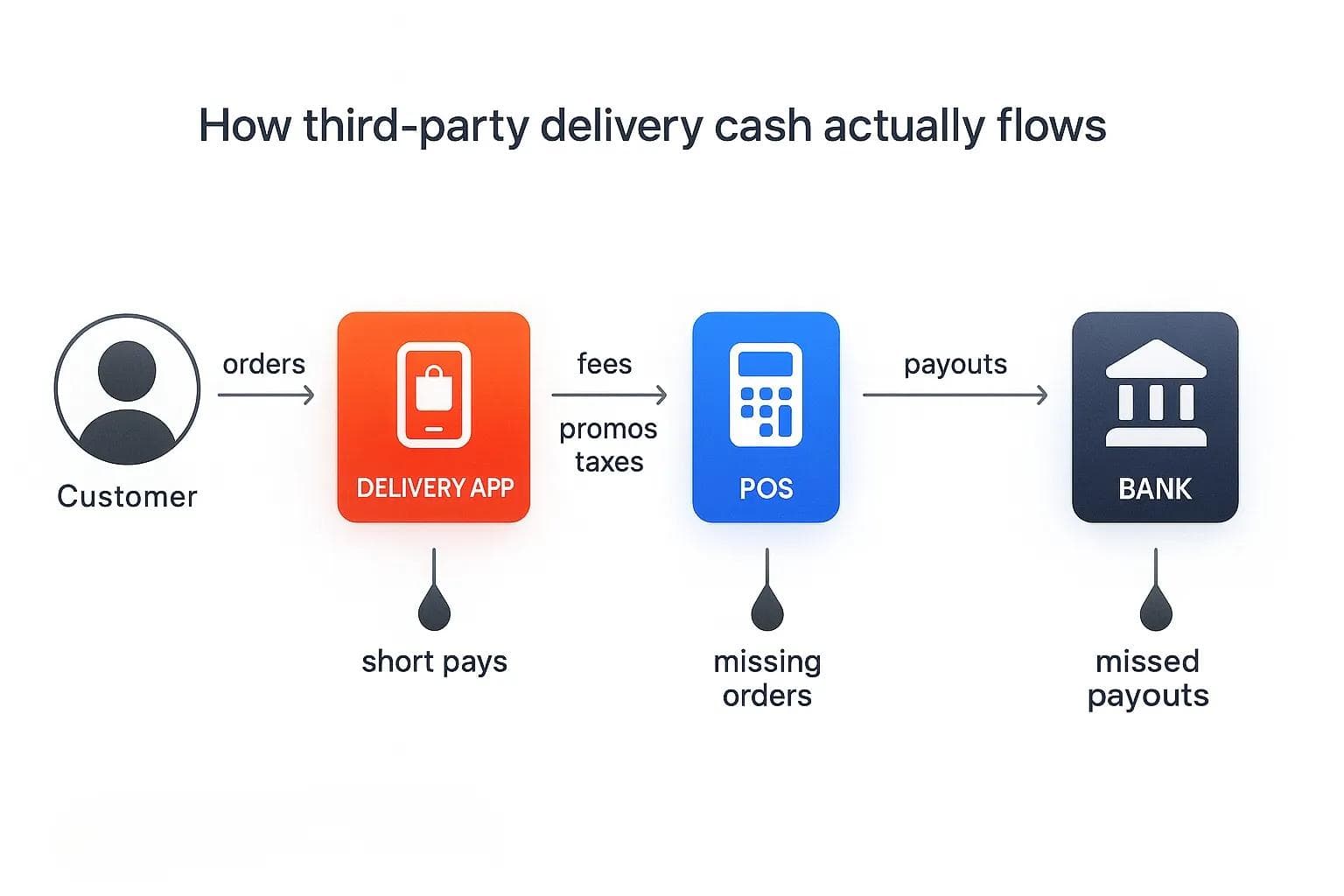
Third party delivery reconciliation is the process of matching every order from apps like DoorDash, Uber Eats, and Grubhub to your POS records, payout reports, and bank deposits. Done right, it shows what each marketplace should have paid, what actually hit the bank, and where leaks or errors are hiding.
Advisory firms have been warning for years that third party delivery is much trickier to account for than in-house sales. There are questions about who is the “principal,” how to handle fees and taxes, and whether to record revenue on a gross or net basis - all of which make reconciliation more than a quick bank rec.
For a typical multi-unit group, third party delivery reconciliation means dealing with:
- Multiple platforms, each with their own reporting format and cutoff times
- A POS that doesn't always capture every fee, promo, or tax the way the app does
- An accounting system that wasn't built for this much detail on a daily basis
- Bank deposits that bundle several days or stores together
If you’re doing this in spreadsheets, it’s no surprise if month‑end feels like a crime scene investigation.
Why do restaurants lose money on delivery app payouts?
Let’s zoom in on the usual suspects.
1. Fees and commissions that don’t line up
Third party delivery runs on fees. Industry guidance often cites commission and delivery cost ranges somewhere in the mid‑teens to mid‑twenties as a percentage of the order, plus credit card fees. On a $50 ticket, it’s not unusual for a restaurant to net far less than expected after everything is taken out.
Common charges include:
- Base commissions
- Delivery and service fees
- Marketing and boost fees
- Promo subsidies and discounts
- Taxes and tax-withheld amounts
The problem? Fee names and structures differ by platform. What’s labeled as a “service fee” in one place might show up as an “adjustment” somewhere else. Without solid reconciliation, it’s hard to tell if what you’re paying matches your contract.
2. Promos, refunds, and error charges
Promotions and refunds are where many “mystery gaps” live:
- Promos that are partially funded by the platform but still show up as reductions in your payout
- Refunds that were granted but never clearly tied to a POS check
- Error charges where the delivery app decided the restaurant was at fault and pulled back the full amount
Operators often don’t have a structured way to validate these amounts, so they quietly accept them as the cost of doing business.
3. Data that doesn’t sync across systems
Even when the fees are fair, your systems may not be in sync:
- Order IDs may not match between the marketplace and the POS
- Dates can differ because of time zones or payout cycles
- Deposits often include multiple days, brands, or locations
- Taxes may be handled differently in your POS, on the delivery app, and in your accounting software
Finance experts keep coming back to the same advice: you need a single source of truth for third party delivery data if you want to know whether this channel is really profitable.
4. Limited time and headcount
All of this would be manageable if you had unlimited time.
In reality, finance and ops teams are already stretched. They may pull a quick payout report, spot‑check a handful of orders, and then move on. Variances that don’t scream “fraud” often never get investigated. Over a year, that adds up.
How to fix third party delivery reconciliation in 30 days
You don’t have to build a perfect reconciliation process overnight. What you can do is follow a focused, 30‑day plan to move from “we eyeball it” to a repeatable, mostly automated workflow.
30 days plan fix third party delivery reconciliation:
- Map every delivery platform, POS, and accounting system.
- Standardize payout and order exports.
- Reconcile one priority marketplace end-to-end.
- Layer in POS vs 3PD vs bank checks.
- Add disputes and error-charge workflows.
- Tie reviews, cancellations, and downtime to dollars.
- Automate recurring reports and alerts.
- Lock in a monthly reconciliation ritual.
Let’s break that down week by week.
Week 1 – Map your third party delivery stack and data flows
The Week‑1 goal is simple: see the entire flow of money and data.
List every system involved
For each brand and location, write down:
- Delivery apps you use (for example: DoorDash, Uber Eats, Grubhub)
- POS or order hub (Toast, Olo, Lunchbox, Novadine, Appfront, and others)
- Accounting system (Restaurant365, QuickBooks, Xero, or similar)
- Bank accounts where 3PD deposits land
If you’re a Voosh customer, this is essentially the same list you connect into the Financial Reconciliation Suite, which supports these marketplace, POS, and accounting platforms.
Document what data you can export
For each platform, identify:
- What you can export: order-level data, payout reports, adjustments, taxes
- How often: daily, payout-based, or custom ranges
- Format: CSV, Excel, PDFs, or via API
You’re not trying to perfect your integration map; you just need to know what’s possible so you can design a clean reconciliation flow.
Align key identifiers
Pick a primary way to line things up:
- Marketplace order ID
- Location/store ID or listing ID
- Payout batch ID and deposit reference
Where those IDs are missing in your POS or accounting exports, highlight the gaps. Those are areas where manual work gets painful — and where an intelligence platform like Voosh can later take over by matching orders across systems for you.
By the end of Week 1, you should have a simple diagram of how an order flows from Customer → Delivery App → POS → Accounting → Bank — and where you currently can’t see clearly.
Week 2 – Reconcile payouts vs estimated earnings
Week 2 is about answering a single question:
“Did we get paid what we should have?”
Start with one marketplace
Pick the delivery app that either:
- Drives the most delivery revenue, or
- Causes the most confusion internally
For that marketplace:
- Export order-level data for a recent 2–4 week period.
- Export the corresponding payout statements.
- Build (or use) a calculator that applies your contracted commissions, promos, and taxes to estimate payouts.
If you’re using Voosh’s Third-Party Reconciliation, this is automated: the platform recalculates expected earnings per order, compares them with actual payouts, and posts deductions as journal entries into your accounting system.
Look for patterns, not one-off errors
Group variances like:
- Commission discrepancies – charged at higher rates than contracted
- Promo mis-funding – promos you expected the platform to fund but were deducted
- Tax mismatches – amounts that don’t align by market or menu category
- Error charges and adjustments – potentially disputable deductions
Advisory firms often warn that category-level issues — such as mis-coded fees or misunderstood promotions — create the biggest long-term revenue leaks.
Decide what “material” means for you
Agree on thresholds:
- Minimum dollar amount per variance to investigate
- Minimum total variance per location or brand
- Time window for action (e.g., disputes filed within 10–15 days)
Document these thresholds — they will eventually become your alert rules once you automate.
Week 3 – Connect POS and bank data for full visibility
By Week 3, you want more than “payout vs estimate.” You want payout vs POS vs bank
Match marketplace orders to your POS
Using your exports:
- Match each marketplace order to a POS ticket wherever possible.
- Flag orders that appear in the POS but not in marketplace data (potential uncollected revenue).
- Flag orders that appear in marketplace data but not in POS (risk of operational or accounting gaps).
Voosh’s Third-Party, POS and Bank Reconciliation module performs this three-way match, identifying missing orders, payouts, or tips and posting discrepancies as automated journal entries with store- and order-level detail.
Tie payout statements to bank deposits
Next, connect payout reports to deposits:
- Group payouts by deposit batch ID or date.
- Match those batches to deposits in your bank export.
- Flag any missing or partial deposits for follow-up.
Voosh’s Banking Integration and Automated Journal Entries handle this step by pushing clean entries into your accounting system while maintaining an audit trail, approvals, and rollback options.
Build a simple monthly reconciliation summary
By the end of Week 3, you should be able to produce a clean summary per brand:
- Gross sales by marketplace
- Total deductions (commissions, fees, promos, taxes, error charges)
- Net payout
- Bank deposits
- Variance amount and variance percentage
That summary becomes the backbone of your third-party delivery scorecard.
Week 4 – Layer in disputes, reviews, promotions, and downtime
Financial reconciliation tells you where money is missing. Week 4 focuses on understanding why — and putting in routines to stop those leaks before they show up in your payouts.
Add a disputes and error-charge workflow
You don’t need to dispute everything. You do need a clear process for what matters.
Basic workflow:
- Pull a weekly list of error charges and adjustments above your “material” threshold.
- Assign ownership by brand or region (ops manager, above-store leader, or centralized specialist).
- Set a weekly cadence to file, track, and review disputes and their outcomes.
Voosh's Automated Dispute Resolution module scans every marketplace order for errors like missing items, incorrect cancellations, and wrong fees, packages evidence where available, and auto-submits disputes to supported channels such as DoorDash, Uber Eats, Grubhub, DoorDash Drive, and Uber Direct.
Even if you’re not using automation yet, you can copy the logic: identify eligible orders, gather proof, and track results in one central queue.
Connect reviews and cancellations to dollars
Customer experience affects reconciliation:
- Slow prep times and order accuracy issues drive cancellations and refunds
- Poor ratings reduce conversion, shrinking the top of your third-party delivery funnel
With Voosh’s Reviews & Reputation Management module, you can centralize reviews from major delivery apps, Google, and Yelp, use AI-powered auto-replies tuned to star rating and sentiment, and monitor trends by store.
In this playbook, your Week-4 goal is to:
- Identify stores with low ratings or high cancellation rates
- Estimate the revenue impact of those issues
- Create a simple rule like: “Every review three stars or below gets a response within 24 hours”
For a deeper dive, you can read reply to delivery app reviews at scale once that article is live.
Treat downtime as an invisible variance driver
Unplanned downtime on delivery apps doesn’t show up as a line item on your payout report, but it still hurts sales and affects reconciliation accuracy.
Voosh’s Marketplace Uptime Automation monitors store status in real time, sends alerts when stores go offline, auto-reopens locations, and provides downtime analytics — including heat maps of when and where downtime occurs.
As part of the 30-day plan:
- Pull 30–60 days of downtime data by store
- Estimate lost sales for high-downtime locations using average hourly sales
- Add “Downtime hours” and “Estimated lost sales” to your monthly scorecard
For more detail on this automation, check out Voosh Marketplace Store Uptime Automation.
Include promotions and ads in your reconciliation story
Promotions and ads impact both revenue and deductions:
- They reduce effective ticket averages
- They often create extra promo/marketing lines on payout reports
Voosh’s Ads & Promotions Analytics dashboard lets you track promo and ads ROI, sales uplift, cost-per-promotion, and click-through rate, and compare performance across brands and channels.
In Week 4, keep it simple:
- Build a view of promo/ads spend vs incremental sales by marketplace
- Label each major promotion as: profitable, brand-building, or “we’re not sure yet”
You can always spin off a separate “profitable promos” workshop once the reconciliation basics are in place.
What your third party delivery scorecard should include
By Day 30, you should have a single monthly scorecard for each brand or region that everyone can understand.
A practical layout:
- Payout summary
- Gross 3PD sales by marketplace
- Total deductions by type (commissions, fees, promos, taxes, error charges)
- Net payout and payout margin
- Reconciliation metrics
- Variance between estimated and actual payout
- Number and value of unmatched orders (POS vs marketplace vs bank)
- Number and value of missing or partial deposits
- Dispute outcomes
- Disputes filed, approved, denied, pending
- Dollars recovered vs dollars lost to expired windows
- Customer and ops drivers
- Average rating by channel
- Review response time and response rate
- Cancellation and error-charge rate
- Downtime and promos
- Downtime hours by store and estimated lost sales
- Promo/ads spend vs incremental sales uplift
If you’re already on Voosh, most of these metrics are available directly inside the Financial Reconciliation, Automated Dispute Resolution, Reviews, Downtime, and Promotions modules or as CSV/PDF exports.
Where automation (like Voosh) actually saves you time
You can absolutely run this 30-day play using spreadsheets. But at some point, the manual work becomes its own full-time job.
Here’s where automation usually pays for itself fastest:
- Third-party reconciliation
- Automatically recalculating per-order earnings based on orders, fees, promos, and taxes, then comparing that to statements and posting deduction entries into accounting.
- 3PD, POS, and bank reconciliation
- Tying out marketplace orders against POS records and bank deposits, flagging missing orders, payouts, or fees.
- Dispute detection and filing
- Scanning every order for errors, packaging evidence, and auto-submitting disputes to supported platforms so your team focuses on exceptions, not hunting for cases.
- Review replies and reputation management
- Using AI-powered auto-replies for straightforward reviews, while giving your team manual controls for sensitive situations — all from a single inbox.
- Downtime detection and auto-reopen
- Watching marketplace availability and automatically turning stores back on when they go offline unintentionally, with alerting for your team.
- Promo and ads analytics
- Measuring true uplift and net margin for each campaign instead of guessing from top-line sales.
If you want a deeper product-level view of the finance side, Voosh Finance Reconciliation is a good next step.
How to keep your reconciliation clean every month
Once you’ve run this 30-day playbook once, the goal is to make it part of how you run the business - not a one-off project.
A simple cadence:
- Daily (store/ops level)
- Spot-check yesterday’s orders for obvious issues.
- Confirm there were no surprise downtimes or unusual cancellations.
- Weekly (brand/region level)
- Review reconciliation variances and new error charges.
- Check the disputes queue and upcoming expiry deadlines.
- Look at ratings, response times, and downtime hot spots.
- Monthly (exec/finance level)
- Review the consolidated third party delivery scorecard.
- Adjust promo/ads strategy based on ROI.
- Decide on any structural changes (pricing, contracts, tooling).
Role-based access controls, custom alerts (email/SMS), and downloadable reports inside Voosh make this easier: finance doesn’t have to chase ops for exports, and ops doesn’t have to chase accounting for answers. Everyone is looking at the same source of truth from gross sales to actual cash in the bank.
When is it time to bring in a third party delivery intelligence platform?
If any of the following sound familiar, you’re past the point where spreadsheets are sustainable:
- You’re running 5+ locations and using two or more third party delivery apps.
- Third party delivery is a meaningful share of revenue and growing.
- Month-end reconciliation takes more than a day and still doesn’t feel reliable.
- No one can quickly answer, “How much did we lose to error charges last month?”
- You aren’t tracking downtime, promos, or reviews in the same place as payouts.
Voosh is designed to be that one place. It connects marketplace data (DoorDash, Uber Eats, Grubhub, ezCater), POS and order hubs (Toast, Olo, Lunchbox, Novadine, Appfront, and others), accounting systems (Restaurant365, QuickBooks, Xero, and others), and secure bank feeds. On top of that, it layers in Automated Dispute Resolution, Financial Reconciliation, Reviews & Reputation, Downtime Controller, and Ads & Promotions Analytics and services.
You can absolutely run this 30-day playbook without Voosh. But if you want this to feel less like a special project and more like “how we run third party delivery,” a dedicated intelligence platform is what keeps the flywheel turning.
Ready to see what this looks like with your own data?
Book a Voosh demo and we’ll walk through your current third party delivery setup, highlight the biggest reconciliation and revenue‑leak opportunities, and show how quickly you can get from CSV chaos to a clean, trusted scorecard.
FAQ
What is third party delivery reconciliation for restaurants?
It's the process of matching delivery app orders and payouts to your POS records, accounting entries, and bank deposits. The goal is to confirm you were paid correctly, identify short-pays and missing deposits, and understand how fees, promos, taxes, and error charges affect your true net revenue.
Why is reconciling delivery app payouts so complicated?
Because the data lives in multiple systems that weren’t built to work together. Each delivery platform has its own reports and cutoff times, your POS may not capture every fee or promo in the same way, and your bank deposits often bundle several days or stores. Without a structured process and the right tooling, variances slip through.
How often should I reconcile third party delivery orders?
At a minimum, you should reconcile third party delivery monthly so your financial statements are accurate. Many multi-unit brands also do a lighter weekly review to catch issues early, and some high-volume concepts monitor key metrics like short-pay flags and error charges daily.
Can a smaller restaurant group automate third party delivery reconciliation?
Yes. You don’t need hundreds of locations to benefit from automation. Once you’re running a few locations across more than one delivery app, automation can handle the heavy lifting of matching orders across systems, recalculating expected payouts, and posting journal entries so your team focuses on investigating exceptions instead of maintaining spreadsheets.
How do promotions and discounts affect reconciliation?
Promos and discounts change both sides of the equation: they reduce gross revenue and often create extra deduction lines in your payout statements. To reconcile accurately, you need to distinguish platform-funded promos from restaurant-funded offers and make sure those amounts are mapped correctly in your payout, POS, and accounting data so you can see their true impact on margins.