Delivery App Prep Time: The Setting That's Quietly Costing You Orders
Summary Highlights
Learn how to set and optimize delivery app prep times to protect your platform ranking, reduce driver wait penalties, and recover lost order volume.
Delivery App Prep Time: The Setting That's Quietly Costing You Orders
There's a number buried in every delivery app's settings that most restaurant operators set once - usually when they first go live - and never touch again. It's not your commission rate. It's not your menu price. It's your prep time.
That single figure, often set at a round number like 20 or 30 minutes, quietly shapes how often your store appears in customer searches, how long drivers idle at your counter, how hot the food arrives, and whether your on-time rate climbs or tanks. And for multi-location operators managing dozens of stores across DoorDash, Uber Eats, and Grubhub simultaneously, a miscalibrated prep time isn't a minor inconvenience - it's a compounding revenue leak.
This guide breaks down what prep time actually does, how to find your real number using data, and how to adjust it strategically by daypart, location, and volume so you stop leaving performance on the table.
Quick definition: Delivery app prep time is the estimated time you tell the platform it takes your kitchen to prepare an order from the moment it's confirmed. Platforms use this figure to schedule driver dispatch, calculate customer ETAs, and assess your on-time delivery rate - which directly affects your store's ranking and visibility.
What Is Prep Time on Delivery Apps - and Why Does It Matter?
How Platforms Use Prep Time in Their Dispatch Algorithms
When a customer places an order, the delivery platform immediately starts doing math. It calculates when to send a driver so they arrive at your location close to when the order is ready - not before (which means a driver standing around), and not after (which means cold food sitting on the pass).
Your stated prep time is the anchor for that calculation. Set it too low and drivers arrive while your kitchen is still mid-ticket. Set it too high and drivers get dispatched late, orders sit waiting for pickup, and your actual delivery time balloons - which translates directly to poor customer reviews and lower star ratings.
Beyond dispatch, platforms like DoorDash factor on-time pickup rate into their broader restaurant quality scores. A consistently low on-time rate - caused by a prep time that doesn't match kitchen reality - can suppress your store in search results and reduce how often you appear in algorithm-driven recommendations like "Top Restaurants" or platform-sponsored placements.
The Three Downstream Effects Operators Don't See Coming
- Driver wait-time penalties. Drivers who wait consistently at your store rate you lower on internal metrics. Over time, this can make your location less attractive to Dashers and Uber Eats couriers, leading to longer assignment delays - especially during peak hours when driver supply is tight.
- Customer ETA inflation. If drivers arrive late because your prep time is set too short and they have to wait, the platform's ETA calculation breaks down. Customers who ordered expecting 35 minutes start seeing updates pushing delivery to 50 or 55 minutes. That's a review waiting to happen.
- Cancellation rate creep. Long waits drive both driver and customer cancellations. A driver who's been at your counter for 12 minutes will eventually drop the order - and platforms track that. Per Voosh data from 2025, restaurants with miscalibrated prep times see cancellation rates 30-40% higher than those that have calibrated by daypart.
Cancellations don't just cost you that sale - they trigger a cascade of issues detailed in our guide to order cancellation rates on delivery apps.
The Five Signs Your Prep Time Is Wrong
You don't need a data analyst to spot the symptoms. These are the signals operators see every week:
- Drivers consistently waiting 5+ minutes at your counter during rush hours.
- Customer reviews mentioning cold food, long waits, or orders arriving later than expected.
- Your on-time delivery rate on DoorDash or Uber Eats is below 85%.
- Your cancellation rate spikes on Friday and Saturday nights compared to Tuesday lunch.
- You set your prep time once at launch and it's been the same number ever since.
If any three of the above apply, you have a prep time problem. The good news: it's one of the fastest operational fixes available to delivery operators.
How to Find Your Real Prep Time (with Data)
Using Your Delivery Platform Reports
Each major platform gives you access to order-level data. Here's where to look:
- DoorDash Merchant Portal: Navigate to Operations Quality. You'll find your Average Prep Time alongside your Pickup Accuracy metric. Compare your actual average to your stated prep time - the gap tells the story.
- Uber Eats Manager: Check your Restaurant Operations Score. The Order Preparation section breaks down how often orders are ready when drivers arrive versus how often drivers wait.
- Grubhub for Restaurants: Look at your Restaurant Report Card. Grubhub grades your prep time accuracy and flags locations with persistent issues.
What you're looking for: the delta between your stated prep time and the actual time between order confirmation and driver pickup. If your stated prep time is 20 minutes but your actual average is 28 minutes, your effective prep time needs to be at least 25–27 minutes (you want some buffer, but not so much that orders sit cold).
Cross-Platform Benchmarking
One mistake operators make: checking prep time performance on only one platform. Your DoorDash numbers might look fine while your Uber Eats metrics are quietly degrading. If your operations differ between platforms (different menus, different order volumes, different peak windows), each platform deserves its own calibration.
Multi-location operators face a compounding challenge: 20 locations across three platforms means up to 60 individual prep time settings to manage intelligently. That's where centralized delivery data and multi-unit delivery operations management become critical.
Calibrating Prep Time by Daypart and Volume
Peak vs. Off-Peak Settings
A 20-minute prep time might be accurate for a Tuesday lunch with 8 simultaneous orders. It's wildly optimistic for a Friday dinner with 25. Most delivery platforms now support scheduled prep time adjustments - you can set different prep times for different windows. Use them.
A practical starting framework:
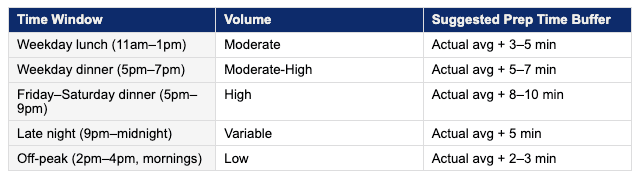
The buffer accounts for variability - a rush of tickets, a staffing gap, a supplier substitution mid-service. You're not inflating prep time to be lazy; you're setting it to reflect reality so your on-time rate stays healthy.
Weekend vs. Weekday
Weekend shifts have different kitchen dynamics: higher order volume, often different staff, and more complex tickets (people order more on weekends). Restaurants that use a flat prep time across the entire week are almost always under-set on weekends and over-set on Monday mornings.
Review your platform reports and pull average actual prep times by day of week. You'll likely find a 4-7 minute difference between your fastest day and your slowest. That gap should be reflected in your settings.
Multi-Location Operators: Why Every Store Needs Its Own Prep Time
This is the one that catches growing brands off guard. When a restaurant group expands from 3 to 15 to 40 locations, there's a natural temptation to standardize everything - including prep times. It makes sense operationally: fewer variables to manage, easier training, consistent guest experience.
But kitchens aren't identical. A flagship location in a dense urban market with 4 dedicated delivery prep stations has a fundamentally different capacity from a suburban franchise with a shared kitchen line. Applying the same 22-minute prep time to both means one is chronically late and one is chronically over-promising.
The discipline here is treating prep time as a location-specific metric, reviewed quarterly at minimum and adjusted whenever you see a meaningful shift in order volume, staffing, or kitchen layout. It's operational housekeeping that pays recurring dividends.
For a deeper look at running delivery efficiently across locations, see our guide to delivery app downtime and its revenue impact.
How Automated Intelligence Keeps Prep Time in Check
Manual prep time management has an obvious ceiling. You can review platform reports quarterly, adjust settings, and monitor performance - but you're always looking backwards. By the time you notice the on-time rate has slipped, you've already taken the ranking hit.
Platforms like Voosh surface delivery performance data across all your third-party platforms in a single dashboard, so you can see on-time rate, average actual prep time, and cancellation rate without logging into three separate portals and building spreadsheets. When a location's metrics start trending in the wrong direction, you catch it early - before the algorithm does.
Voosh's analytics layer also lets multi-unit operators compare prep time performance across their entire portfolio. If Location A in Phoenix has an 89% on-time rate and Location B in Denver has a 74% on-time rate on an identical menu, the data surfaces that gap and prompts a conversation about what's different - whether that's staffing, volume, kitchen layout, or simply a prep time setting that was never updated.
See how this connects to broader delivery performance: food delivery KPIs every restaurant should track.
Voosh data (2025): Restaurants that actively manage and adjust prep times based on operational data see on-time delivery rates 15-22 percentage points higher than those using static, launch-day prep time settings.
The Quick-Start Checklist: Audit Your Prep Times This Week
- Log into each delivery platform's merchant portal (DoorDash, Uber Eats, Grubhub) and pull your last 30 days of order data.
- Calculate your actual average prep time per platform and compare it to your stated prep time. Note the delta.
- Check your on-time delivery rate on each platform. Flag any location below 85%.
- Review your cancellation rate by day of week. Identify your highest-volume days.
- Adjust prep time settings to reflect actual average + appropriate buffer, differentiated by peak/off-peak if your platform supports it.
- Set a calendar reminder to review prep time performance 30 days after adjustment.
For multi-location operators: run this audit per location, not as a portfolio average.
Conclusion
Prep time is one of those operational details that feels too small to matter - until you look at the data and realize it's been quietly suppressing your ranking, frustrating your drivers, and eroding your star rating for months. The fix isn't complex. It's a data-informed adjustment that takes an afternoon to get right and pays off in on-time rates, happier couriers, and better customer experiences every day after.
If you're managing delivery across multiple locations or multiple platforms, doing this manually is time-consuming. The operators gaining ground on delivery aren't the ones who've cut costs the deepest - they're the ones running tighter operations with better data. Prep time calibration is one of the first places to start.
Want to see your delivery performance metrics across all platforms in one place?
Book a demo with us → voosh