Restaurant Ad Budgets: Control Delivery App Spending
Summary Highlights
Build a clear spending plan for delivery app ads and offers. Check budget periods, shared versus per-location amounts, campaign dates and the costs each setting covers.
A restaurant ad budget should answer a simple question: how much have we agreed to spend, across which locations, and for how long?
That answer can get lost between a daily ad setting, a weekly offer, and another campaign running at a different store. Each setting may look reasonable on its own. Together, they need one clear plan.
To control delivery app ad spending, identify the period and scope of every active budget, distinguish averages from hard limits, and account for merchant-funded promotions separately. Then check the combined commitment against the amount your business has approved. A campaign setting alone is not a complete restaurant marketing budget.
This guide gives restaurant operators a practical way to make that check before launch, with a reusable control sheet and an illustrative example. It focuses on DoorDash and Uber Eats in the United States. Available controls vary by tool, account and campaign type.
Set one spending plan before opening a campaign
Start with the business decision, then configure the campaign.
Write down the amount available for the test, the dates it covers, the participating locations and the person who can approve a change. Define what the amount includes. Paid advertising, merchant-funded discounts and applicable campaign fees should not disappear into separate conversations.
Keep operating costs, such as food and labor, visible in your performance review too. They affect whether a campaign is worthwhile, even when they are outside the marketing allowance you are setting here.
A useful instruction is specific: “This test covers these stores, these campaigns and this period. Any increase needs the named owner's approval.” The amount should come from your business's priorities and capacity. A generic percentage of sales cannot make that decision for you.
If a platform offers an average budget rather than the hard limit your plan requires, resolve that difference before launch. Ask what maximum exposure the applicable terms permit and which controls are available. A spreadsheet entry does not enforce a platform limit.
Read what the budget setting actually controls
Two fields labeled “budget” can govern different things. Before entering an amount, check four dimensions.
Period. Is the amount daily, weekly or for the campaign's lifetime? When does the period reset, and which time zone applies?
Limit type. Is it an average, a maximum or an uncapped option? An average is not a promise that every individual day will stay below that number.
Scope. Does the amount apply once to the whole campaign, to an ad group, or independently to each selected restaurant?
Duration. Does the campaign end on a set date, renew for another period, or continue until someone pauses it?
These distinctions appear in current platform documentation. For Sponsored Keyword campaigns in Uber Marketing Manager, Uber describes daily spending as an average, weekly spending as a maximum, and lifetime spending as a fixed allocation. Those definitions belong to that specific workflow; do not assume every Uber Eats ad tool has identical settings. See Uber's campaign budget guidance.
Read the field label, supporting explanation and terms in the account you are using. If they do not give a clear answer, confirm the rule with platform support before committing the spend.
Total commitments without multiplying the wrong number
Use one row for each independently governed spending allowance. This keeps the total tied to the way campaigns are configured.
If three restaurants have three separate budgets, include all three. If the restaurants share one campaign budget, count that shared amount once. Store count alone does not tell you how much is committed.
For example, DoorDash's Ads Manager documentation describes ad groups sharing a campaign budget. That is a useful reason to inspect the campaign structure, not a reason to assume every DoorDash account works the same way. See DoorDash's Sponsored Listings setup guide.
Keep the budget separate from the bid. A bid governs what you are willing to pay for the relevant advertising action. It does not, by itself, define the total amount authorized across all campaigns and locations.
A simple planning example
The following numbers are hypothetical. They illustrate arithmetic, not a recommended budget, a platform guarantee or an expected result.
Suppose a restaurant group plans three independent daily ad allowances of $15, each for seven days. It separately approves $150 for merchant-funded offers over the same period.
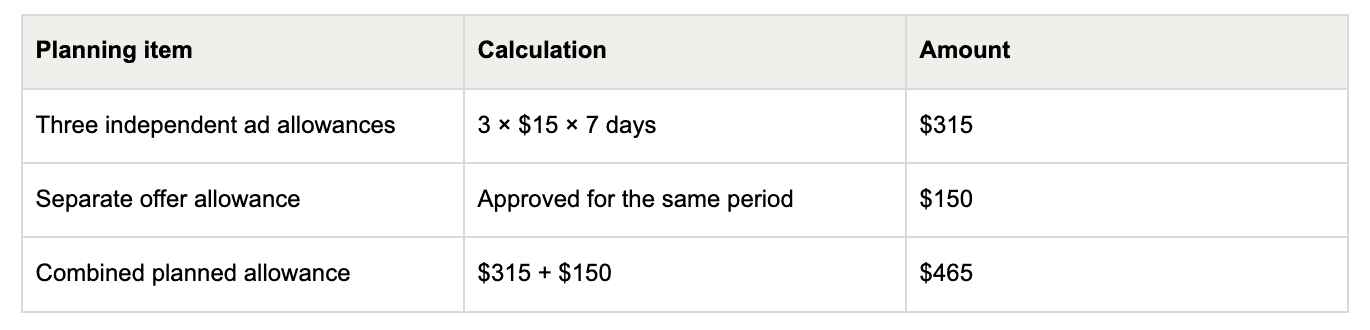
If the three stores instead share one $15 daily allowance, the ad portion is $105 for seven days. Adding the same $150 offer allowance gives $255. The difference comes from budget scope, not restaurant performance.
Both totals exclude any fees outside those settings. If a daily amount is an average, the calculation is a planning figure, not a guaranteed invoice maximum. Confirm the actual controls and cost coverage before using either total as a spending ceiling.
Give promotions their own line
An ad budget and an offer budget answer different questions. Do not assume an advertising limit also controls every discount a guest can redeem.
For example, DoorDash's Smart Campaign promotion settings include either no cap or a weekly average limit, along with store selection and campaign dates. Check the current configuration and its terms rather than assuming that another campaign's limit covers it. See DoorDash's Smart Campaign guide.
For each offer, record the merchant-funded portion, the eligible stores, the end date and any applicable limits or fees. Where platform funding is involved, verify which portion your restaurant actually pays. Keep an uncertain cost explicit until it is resolved.
Review other active offers at the same time. The goal is a complete view of the commitments you have approved, including campaigns launched by another authorized team member.
Use this budget control sheet
Keep the sheet beside your campaign settings. Update it whenever a budget, store selection or end date changes.
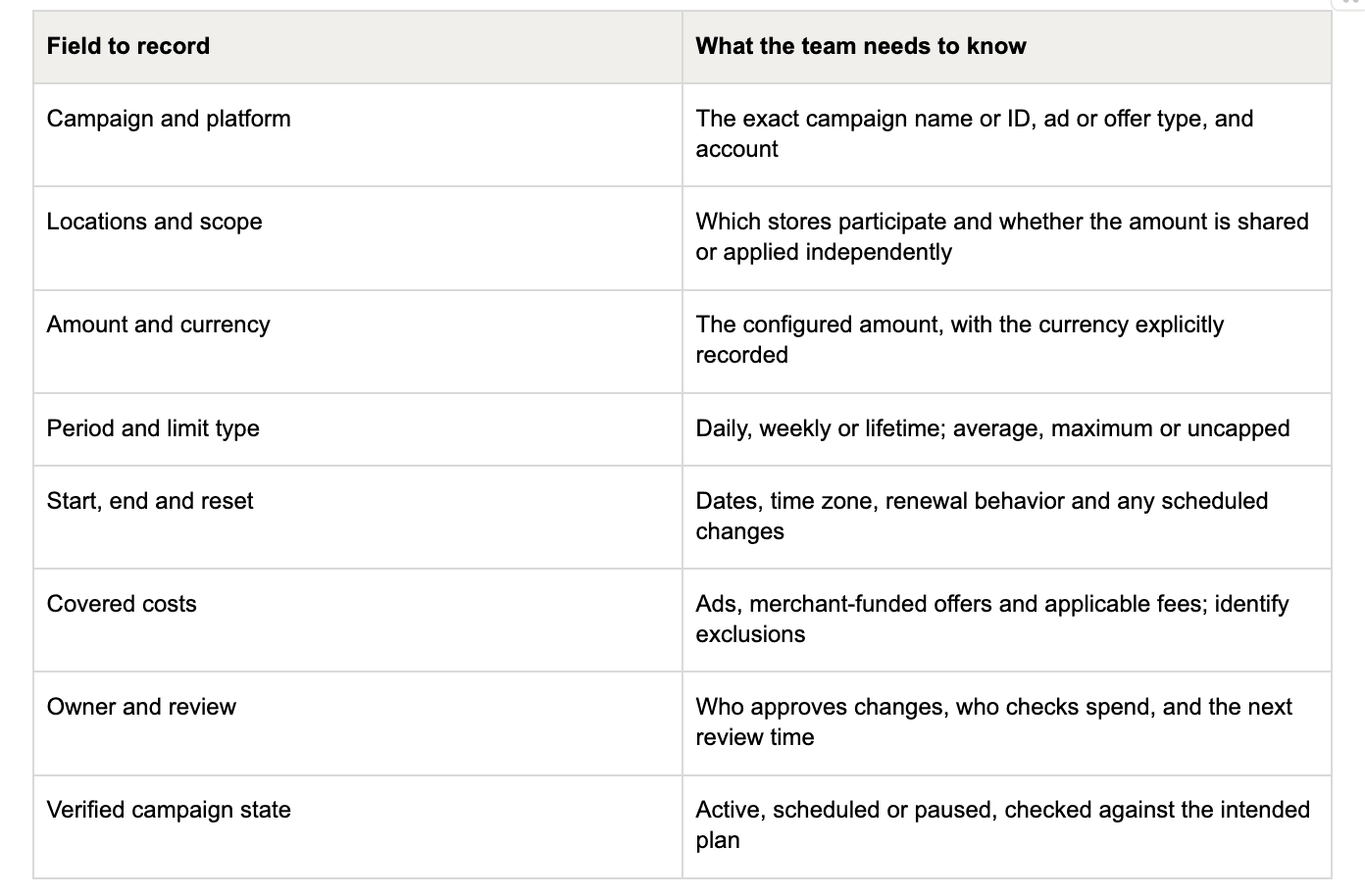
Before launch or a budget change, complete this short check:
- Open the exact campaign and verify the selected restaurants.
- Confirm the budget amount, period, limit type and scope.
- Check the dates, time zone and renewal behavior.
- Add the commitment to the other active ads and offers.
- Confirm the combined plan and any exclusions with the budget owner.
- Save the change, then read back the campaign's actual settings and state.
That final readback matters. A plan in a message is not proof that the account reflects it. Check for an unwanted parallel campaign, a missing end date or a store selection that no longer matches the intended test.
Review spending promptly and results on complete data
Spend control and performance evaluation need different checks.
If a campaign has the wrong budget or should not be running, the authorized owner should address the configuration promptly. If the question is whether an otherwise correctly configured campaign deserves more investment, first check that the reporting period is complete.
Uber notes that active campaign performance data in its documented workflow can take up to 48 hours to appear. That reporting delay is a reason to interpret early results carefully, not a reason to leave an unwanted campaign active. See Uber's ad controls and reporting guidance.
At review time, put the approved plan beside the actual spend and available performance data. Decide what to keep, what to change and what needs another observation period. Record the next decision and the person responsible for it.
Voosh's ads and promotions analytics can support that review by bringing campaign and location performance into one place. Voosh True ROI helps teams consider campaign costs and estimated contribution margin using food-cost assumptions and available commissions and fees. It supports the spending decision; it should not be treated as an automatic cross-platform budget lock.
For teams that want execution support, Voosh also offers a separate managed service covering campaign planning, setup, optimization and reporting. Read the True ROI introduction for the product's scope.
A clear budget gives every campaign a defined job and every team member a shared reference. Start with the total commitment, confirm the controls, and use the results to decide what earns the next investment.
Book a demo to see how Voosh can help your team review delivery marketing performance.