
Restaurant Cybersecurity for Delivery Apps
Summary Highlights
A practical restaurant cybersecurity guide for protecting delivery-app logins, reviewing vendors, offboarding staff, and responding to suspicious account activity.
Restaurant Cybersecurity for Delivery Apps
Restaurant cybersecurity is easy to picture as a locked-down POS system. Delivery operations create a wider boundary.
A manager may use several marketplace portals through a shared email. A marketing partner may access promotions. Store tablets, personal phones, integrations, and password resets all join the same operating chain.
That chain deserves attention. Verizon’s global 2026 breach research says third-party supply-chain involvement increased 60% and appeared in 48% of breaches in its dataset. It also reports that exploiting software vulnerabilities became the leading initial access method at 31%. Those are not restaurant-only numbers, but they show why vendors, connected systems, and updates belong in an operator’s security plan. (Verizon 2026 DBIR)
What does restaurant cybersecurity include for delivery apps?
Restaurant cybersecurity is the set of people, processes, and technical controls used to protect restaurant systems, accounts, and data from unauthorized access or disruption. For delivery operations, that includes marketplace portals, connected email accounts, store devices, software vendors, user permissions, offboarding, and a tested plan for responding when something looks wrong.
List every marketplace portal, the email account tied to it, connected software, store device, vendor, internal owner, and recovery contact. Record what each system can change. Menu prices, operating hours, bank details, promotions, customer information, and user permissions carry different risks.
For a multi-unit brand, this inventory should live in one controlled location, not in a departing manager’s notebook. A centralized delivery data strategy is easier to govern when the team also knows who owns every connection.
Why does delivery-app security matter operationally?
A compromised account could change hours, menu settings, promotions, or user access. A stolen email account could intercept password resets. A locked-out team might lose the ability to fix an unavailable store during dinner. An over-privileged vendor account could remain open long after a project ends.
The result may be an unavailable store, unauthorized changes, exposed information, lost access, or confusion over who must respond.
Security is therefore an operations discipline as much as an IT discipline. The controls have to work during staff turnover, a busy shift, and an urgent password reset.
Where are the biggest delivery security gaps?
Shared logins hide accountability
One password for every manager feels convenient until the team needs to know who changed a setting. Use named accounts when supported. If sharing is unavoidable, use a business password manager and restrict retrieval.
Never send passwords through group text, a shift chat, or a spreadsheet.
Former employees and vendors keep access
Offboarding must include marketplace portals, shared email, password managers, connected applications, remote access, and recovery methods. The rule applies when a vendor engagement ends or an employee changes roles.
Too much permission expands the blast radius
A store manager may need availability access without user administration. A marketing agency may need campaigns without unrelated data. Give each person and provider the least access needed, with an expiration date for temporary access.
Phishing targets the reset path
Train staff to stop when a message creates urgency around passwords, payouts, refunds, or suspension. Attackers may ask for a code, login approval, or visit to a fake marketplace page. Give employees one internal reporting path.
Unpatched devices and flat networks add avoidable exposure
The FTC recommends keeping software current, controlling access, using multi-factor authentication, and separating guest Wi-Fi from business networks. (FTC Cybersecurity for Small Business)
Set automatic updates where practical, keep business systems off guest networks, and use a qualified IT provider to review network, endpoint, and remote-access controls.
Unapproved AI tools can create a new data path
Employees may paste records or screenshots into a public AI tool to save time. Set a clear rule: no credentials, personal information, customer records, or confidential business data in unapproved AI services.
How can restaurants secure delivery-app access in eight steps?
- Inventory every delivery system and owner. Record the portal, connected email, internal owner, vendor owner, recovery contact, data involved, and the business impact if access is lost.
- Require unique accounts and strong passwords. Use named accounts where supported. Store long, unique passwords in an approved business password manager.
- Turn on multi-factor authentication where supported. Prefer an authenticator app or security key when the service offers it. Protect the connected email account too.
- Give each person and vendor the least access needed. Separate viewing, operating, marketing, financial, and administrative permissions when the platform allows it.
- Separate guest Wi-Fi from business systems. Keep marketplace devices, POS equipment, and back-office systems away from the public network.
- Review vendors and document data flows. Know what data a provider receives, why it needs the data, where it is stored, and which other providers are involved.
- Remove access immediately when roles change. Make the manager, HR, and IT offboarding checklist trigger on the same day.
- Practice the first-hour incident plan. Assign decision owners, marketplace contacts, legal and insurance escalation paths, and a method for preserving evidence.
Build a short access register with these fields:
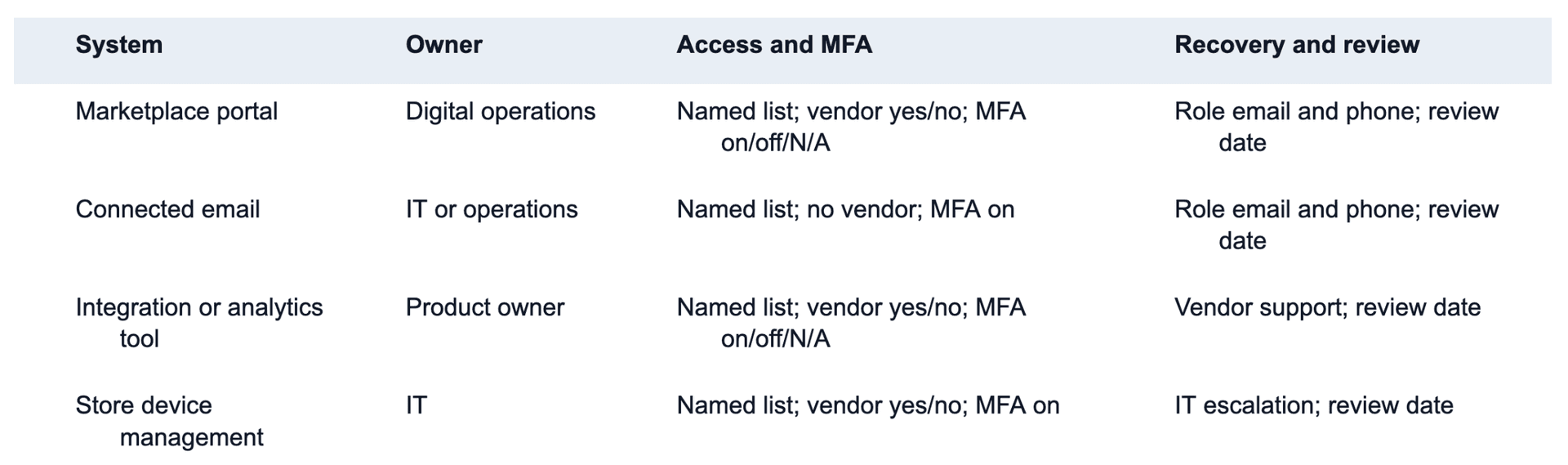
Do not place passwords, backup codes, or sensitive security answers in this register.
What should operators ask restaurant technology vendors?
Vendor review is a documented conversation about scope and responsibility, not a hunt for one logo.
Ask:
- What restaurant data do you collect, process, or store?
- Why is each data category needed, and how long is it retained?
- Which employees can access customer environments, and how is that access approved and removed?
- Do you support MFA, single sign-on, role-based permissions, and audit logs? Which plans include them?
- Which subprocessors or cloud providers handle the data?
- What security assurance reports or independent assessments are available, and what period and product scope do they cover?
- How quickly will you notify us of a security incident that affects our data or operations?
- What happens to our data when the contract ends?
- How are backups, restoration, business continuity, and disaster recovery tested?
- Who owns the incident at 9 p.m. on a Saturday, and how do we reach that team?
For higher-risk systems, involve security, IT, privacy, legal, and procurement professionals. A small operator without those roles can use a qualified outside advisor.
What is the difference between SOC 2 and PCI DSS?
They answer different questions.
A SOC 2 examination evaluates a service organization’s controls against selected Trust Services Criteria. A Type II report covers control design and operating effectiveness over a period. Read its scope, dates, exceptions, complementary user controls, and subservice-organization treatment.
PCI DSS covers environments that store, process, or transmit payment account data. Scope depends on the actual payment flow. Use the PCI Security Standards Council and qualified guidance to determine obligations.
Neither replaces basic access management, patching, training, vendor review, or incident planning.
How should multi-unit teams run access reviews?
Use one standard across the brand and let local leaders confirm the facts.
Every week
- Check urgent access exceptions and suspicious login notices.
- Confirm new managers received only the access their roles require.
- Close access for departures and completed vendor projects.
- Verify that recovery contacts still reach a monitored role account.
Every month
- Review every administrator and shared account.
- Confirm MFA status where the service supports it.
- Find inactive users, duplicate accounts, and unknown integrations.
- Compare marketplace access with the current employee and vendor roster.
Every quarter
- Review higher-risk vendors and current assurance documents.
- Test one account-recovery path without exposing backup codes.
- Run a short incident tabletop: suspicious login, unauthorized menu change, or locked-out store.
- Reconfirm the escalation tree and after-hours contacts.
One person should own the program, with operating steps assigned across relevant teams. For broader marketplace ownership, see marketplace management for restaurants.
What should happen in the first 60 minutes of an incident?
- Open the incident record. Note the time, reporter, affected account, screenshots, alerts, and known changes.
- Contain access. Follow the approved process to disable the affected user, revoke sessions, or contact the provider. Do not destroy evidence.
- Protect the connected email. If compromise is possible, secure that account and its recovery methods through the approved IT process.
- Escalate to the right team. Contact the marketplace or vendor, internal IT or security lead, and the designated legal, privacy, insurance, or executive contacts.
- Check operating settings. Review hours, menus, promotions, payout details, users, and integrations for unauthorized changes.
- Preserve evidence. Keep alerts, timestamps, emails, screenshots, and support case numbers in the incident record.
- Communicate from verified channels. Tell affected stores what to do and what not to do. Avoid speculation.
- Recover carefully. Restore access and settings only after the responsible team confirms the path is safe.
Notification duties vary by jurisdiction, contract, and data involved. Get qualified legal and security advice.
The CISA Food and Agriculture Cybersecurity Checklist and the Canadian Centre for Cyber Security’s top measures for small and medium organizations provide practical starting points for a broader program.
How can Voosh fit into a secure delivery data stack?
Voosh connects third-party delivery data across stores and channels. Depending on enabled modules, that view can include sales, marketplace performance, cancellations, store uptime, reviews, and ads or promotions.
Voosh also publicly reports SOC 2 Type II compliance. Read Voosh’s SOC 2 Type II announcement, then request current security documentation through the proper review process if your organization requires it.
Voosh does not replace your identity provider, endpoint protection, network controls, PCI program, legal counsel, or incident-response team. Its role is connected delivery intelligence, not the entire cybersecurity stack.
That distinction matters. As the delivery operation matures, why order syncing is no longer enough becomes as much a governance question as an analytics one.
Make account security a repeatable operating habit
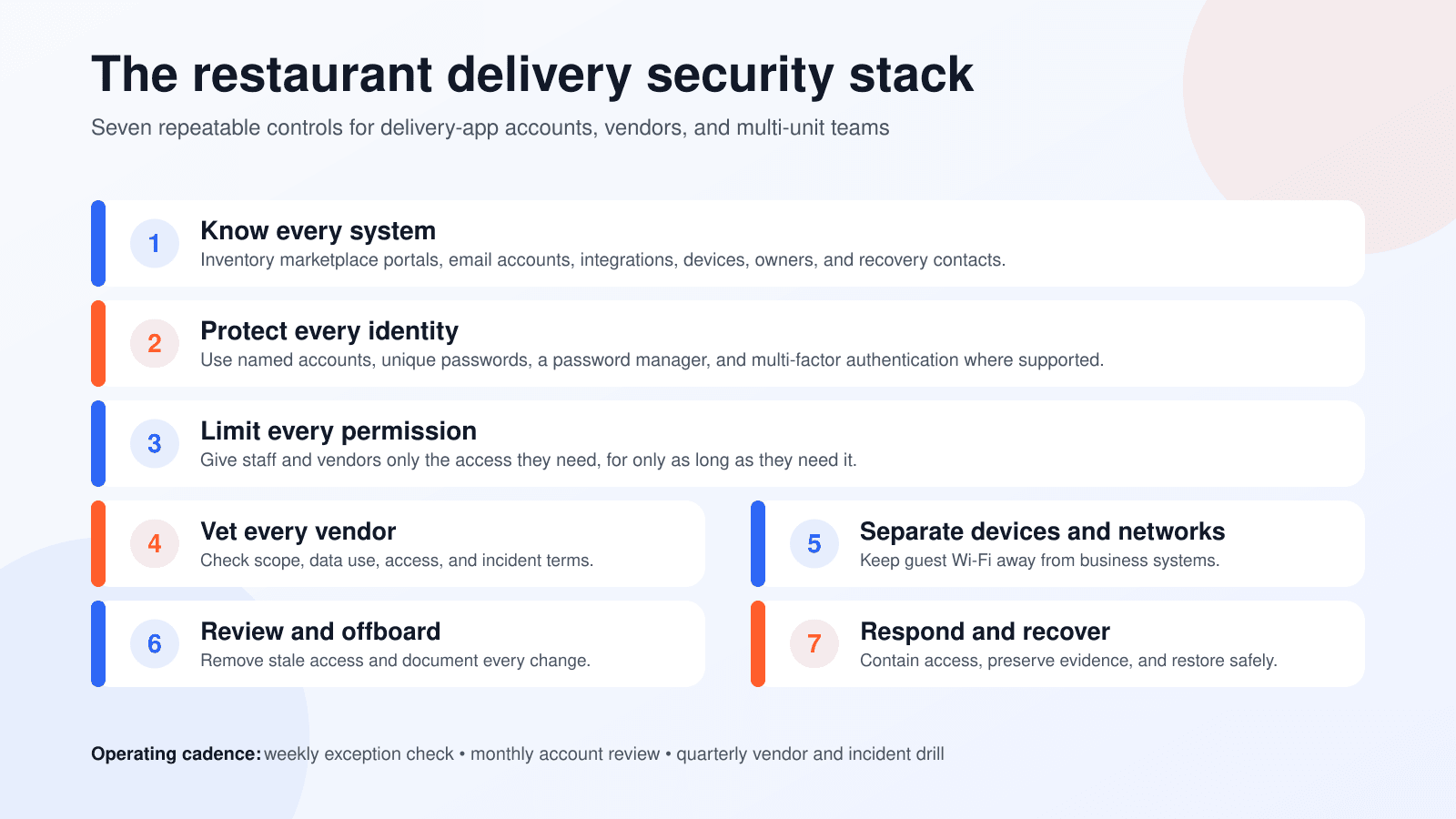
The strongest control is not a binder that gets reviewed once a year. It is a short routine that survives store openings, manager turnover, vendor changes, and a busy Friday night.
Know every system. Protect each identity. Limit permissions. Review vendors. Offboard quickly. Practice the first hour.
Those steps will not eliminate cyber risk, but they remove the avoidable gaps that make a small problem harder to contain.
Want a more connected view of third-party delivery performance across locations? Book a demo.