How to Prepare Your Restaurant for Peak Delivery Demand
Summary Highlights
Holidays and game days crash kitchens that run fine every other day. Learn how to plan prep time, staffing, and menu settings before demand spikes hit.
How to Prepare Your Restaurant for Peak Delivery Demand
Your kitchen runs smoothly on a typical Tuesday. Orders come in at a manageable pace, prep times hold, and your on-time rate looks healthy. Then Super Bowl Sunday hits, or Valentine's Day, or the week before Thanksgiving, and the same kitchen that performed perfectly all year suddenly can't keep up. Orders back up, prep times blow past what's promised, and at some point the platform itself steps in and pauses your store, sometimes without you even requesting it.
This isn't a staffing failure or a sign your operation is poorly run. It's a planning gap. The volume spike was predictable - these dates repeat every year - but the kitchen, the prep time settings, and the staffing plan were built for an average day, not for the surge.
This guide covers what actually happens when demand outpaces capacity, the recurring high-volume windows most operators underestimate, and a five-step readiness plan you can run before the next predictable spike hits.
Quick definition: Peak demand readiness refers to the operational and platform-level preparation a restaurant undertakes ahead of a predictable high-volume period - holidays, major sporting events, or local events - to maintain order accuracy, on-time delivery, and platform standing despite a temporary surge in order volume well above the restaurant's typical daily average.
What Happens When Demand Outpaces Kitchen Capacity
Why This Is a Planning Problem, Not a Technical One
When a kitchen falls behind during a demand spike, the symptoms can look identical to a technical outage from the customer's side - slow acceptance, missed prep windows, an eventual platform-triggered pause. But the cause and the fix are completely different. A technical outage is a connectivity failure, a missed confirmation, or a tablet issue. A peak demand strain is a capacity mismatch: the kitchen, the staffing plan, and the prep time settings were sized for an average day and never adjusted for a day that wasn't average.
For the specific mechanics of how and why platforms pause a store under strain - including the busy-signal triggers themselves - see our breakdown in Uber Eats Store ‘Currently Unavailable’: Why It Happens and How to Fix It. This guide picks up where that one leaves off: not what the pause mechanism is, but how to avoid triggering it in the first place when you can see the surge coming.
Why Prep Time Settings Break Down First
Your stated prep time reflects your kitchen's typical throughput - calibrated, ideally, for normal volume. During a 3x demand spike, every step in your kitchen workflow takes longer: tickets queue, stations bottleneck, and the gap between your stated prep time and your actual prep time widens fast. This is usually the first visible symptom of capacity strain, and it's the same metric that determines whether the platform intervenes.
If you haven't calibrated your baseline prep time settings, start with our guide to delivery app prep time optimization before tackling peak-specific adjustments.
The Predictable Demand Calendar Most Operators Ignore
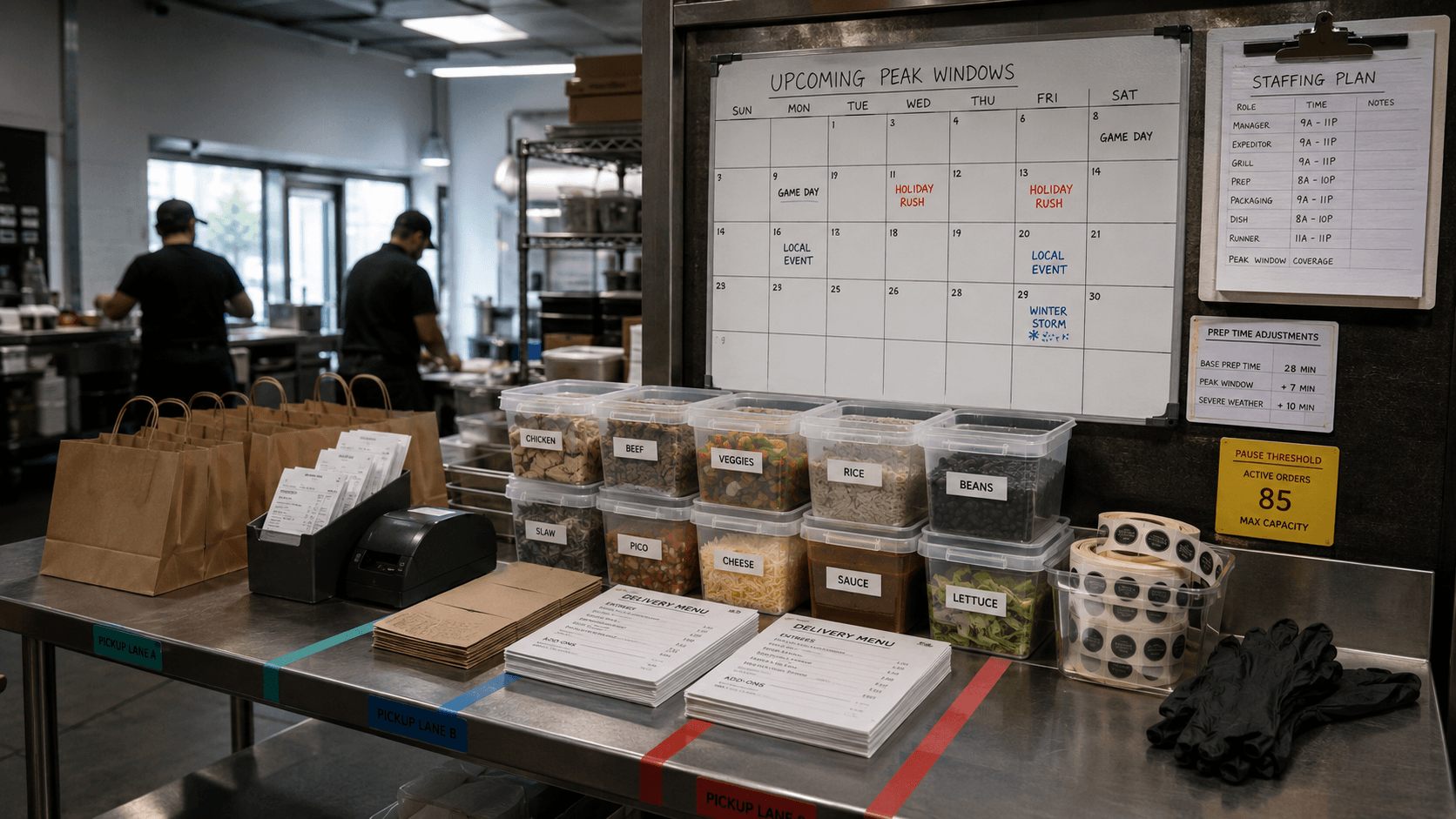
Peak demand isn't random. Across the restaurant delivery industry, a consistent set of dates and windows reliably produces order volume well above typical daily averages. Most operators know some of these intuitively but don't formally plan around them:
- Major sporting events – Super Bowl Sunday is the single largest delivery volume day of the year for many concepts, particularly wings, pizza, and bar food categories.
- Valentine's Day – both a dine-in and delivery surge, with delivery spiking sharply for concepts positioned for date-night or celebratory orders.
- Mother's Day – one of the highest-volume days of the year for brunch and family-dining concepts specifically.
- Thanksgiving Eve and the days surrounding major holidays – irregular patterns as customers avoid cooking but also avoid dining out.
- July 4th and Memorial Day weekend – driven by gathering-based ordering, particularly for concepts with shareable or party-format items.
- Halloween – a sharp, short-window evening spike concentrated in family and casual dining.
- Local and regional events – playoff runs for local sports teams, concerts, festivals, and severe weather events that drive a sudden, less predictable but still anticipatable spike.
The common thread: these are knowable in advance. A readiness plan built around your specific demand calendar - informed by your own historical order data, not just industry generalities - is the difference between a profitable surge day and an auto-paused storefront.
Building a Peak Readiness Plan: Five Steps Before the Surge
Step 1: Pull Historical Data for the Same Event or Window
Before any other planning, look at what actually happened last year on the same date or during the same event window, per location and per platform. Order volume, peak hour within the day, and any complaints or cancellations from that period are your most reliable forecast – far more useful than a generic industry estimate.
If you don't have data from a prior occurrence of the same event (a new location, a first-time event), use the closest comparable demand spike you do have data for and apply a conservative multiplier.
Step 2: Pre-Adjust Prep Time and Throttling Settings
Once you have a volume estimate, proactively increase your stated prep time for the specific window - not your baseline setting, but a temporary, scheduled adjustment for the surge period. This keeps your stated prep time honest relative to what your kitchen can actually deliver at 3x volume, which protects your on-time rate even though individual orders take longer.
If your platform supports order throttling or a maximum concurrent order cap, set it ahead of time based on your realistic ceiling - not your aspirational one. A capped order flow that you fulfill well outperforms an uncapped flow that triggers a platform-initiated pause.
Step 3: Staff to the Surge, Not the Average Day
This sounds obvious and is still the most commonly skipped step. Reviewing historical volume data should translate directly into a staffing plan for the specific window - not your typical Sunday staffing level scaled up casually, but a deliberate plan based on what last year's data showed you actually needed.
For multi-location operators, this is where centralized data matters most: a corporate-level view of which specific locations see the sharpest spikes for which events allows you to allocate additional staffing or cross-location support where it's actually needed, rather than applying a blanket staffing increase everywhere.
Step 4: Simplify the Menu Temporarily
A full menu adds complexity at exactly the moment your kitchen has the least capacity to handle it. Many high-performing operators temporarily restrict their delivery menu during known peak windows - featuring a smaller set of high-volume, fast-to-prep items rather than the complete catalog. This reduces ticket complexity, speeds up prep, and reduces the error rate that tends to spike under pressure.
Order accuracy issues compound under volume stress. See our guide to delivery order accuracy and error rate for the root causes that intensify during high-pressure periods.
Step 5: Set a Manual Pause Threshold Before the Platform Sets One for You
If you know a specific window is going to exceed your kitchen's realistic capacity regardless of preparation, proactively pausing new orders for a defined period is often better than letting the platform intervene mid-surge. A planned, brief pause that you control and communicate is recoverable. A platform-triggered pause that happens because your metrics degraded mid-rush carries a quality score penalty and often takes longer to lift.
What to Do in the Moment When Volume Spikes Unexpectedly
Even with planning, some spikes arrive without warning - a viral social post, an unanticipated local event, a competitor going offline and redirecting demand to you. When volume spikes faster than you can respond structurally, a few in-the-moment actions limit the damage:
- Extend your prep time immediately, even mid-rush. A late adjustment is better than none - it keeps new incoming orders realistic relative to your actual capacity.
- Pull your lowest-margin, highest-prep-time items from the menu temporarily if your platform allows quick 86'ing. This reduces ticket complexity fastest.
- Communicate proactively if your platform supports customer-facing messaging about delays - transparency reduces cancellation and dispute rates compared to silent delays.
- If the surge is sustained and unmanageable, a brief proactive pause is preferable to a sustained period of missed prep times and resulting quality complaints.
Multi-Location Operators: Not Every Store Peaks the Same Way
A 25-location brand doesn't experience Super Bowl Sunday uniformly. A location near a stadium or a popular sports bar district will see a dramatically different spike than a suburban location in a quieter market. Applying the same readiness plan - same staffing increase, same prep time adjustment, same menu simplification - across all locations wastes preparation effort on stores that won't need it and under-prepares the ones that will.
Location-level historical data is the only reliable way to build a readiness plan that matches actual demand patterns. The investment in pulling that data once, building a per-location playbook, and reusing it for each recurring event pays off every year the event repeats.
For the broader framework on managing performance across locations, see the multi-unit delivery operations guide.
Voosh data (2025): Restaurant locations that build a documented readiness plan ahead of known peak demand windows - based on prior-year historical data - see 35% fewer platform-triggered pauses and a 22% smaller prep time overage compared to locations with no formal peak planning process.
Reviewing Performance After the Surge
The window immediately after a known peak demand period is the highest-value time to review what happened - while the data and the operational memory are both fresh. Pull your actual order volume against your forecast, your prep time overage, your error rate during the window, and any platform-triggered interventions.
This becomes the baseline for next year's plan. The operators who get progressively better at handling Super Bowl Sunday or Mother's Day aren't the ones with more luck - they're the ones treating each occurrence as a data point that refines the next readiness plan.
For the broader measurement framework to apply here, see our guide to food delivery KPIs to track.
The Peak Readiness Checklist
- Identify your top 5-8 recurring high-volume windows based on your own historical order data, not generic industry assumptions.
- Pull last year's volume, peak hour, and any complaint or cancellation data for each of those windows, broken out by location.
- Build a per-window staffing plan based on actual historical demand, not your typical day-of-week staffing level.
- Pre-schedule prep time adjustments for each known peak window, ahead of time, on every relevant platform.
- Decide in advance whether you'll run a simplified menu during your highest-volume windows.
- Set a realistic manual pause threshold and decide who has authority to trigger it during the event.
- Schedule a post-event review within 48 hours to capture data while it's fresh for next year's plan.
Conclusion
Peak demand isn't a surprise - it's a known, recurring pattern that most restaurant operators treat as an emergency rather than a plan. The kitchens that handle Super Bowl Sunday, Mother's Day, and the week before Thanksgiving without a quality collapse aren't necessarily better-staffed in general. They're better prepared for those specific windows, using their own historical data instead of guessing.
Building that readiness doesn't require new technology or a major operational overhaul - it requires pulling the data you already have, planning five steps ahead of the surge instead of reacting in the middle of it, and treating every peak event as a chance to improve the plan for next time.
Want to see your historical peak demand data by location and platform?
Book a demo with us → Voosh