Restaurant Staff Training for Delivery Orders
Summary Highlights
Build a restaurant staff training program for delivery orders. Use this practical guide to reduce errors, standardize shifts, and coach every location.
Restaurant Staff Training for Delivery Orders
Most restaurant training programs cover food safety, menu knowledge, service standards, and how to use the POS. Then the first delivery rush arrives.
One employee watches new orders. Another packs bags. A cook reads modifiers from a separate ticket. A driver asks for an order that is not staged. When an item sells out, nobody is sure who owns the next action.
That gap matters when managers are already stretched. In 2025, the National Restaurant Association reported that 77% of operators saw recruitment and retention as a significant challenge. The same research points to structured onboarding, clear expectations, mentorship, and training as practical ways to support employees (source).
A binder alone will not solve the problem. Staff need to see the process, practice realistic exceptions, and demonstrate the work before operating alone.
What is restaurant staff training for delivery orders?
Restaurant staff training for delivery orders is a repeatable program that teaches employees how to accept, prepare, verify, package, stage, and hand off digital orders. It also defines how each role handles modifiers, out-of-stocks, timing issues, cancellations, duplicate tickets, late pickups, and other exceptions before an employee works the process alone.
This is one module inside broader onboarding. It does not replace required food-safety, workplace-safety, allergen, equipment, or local compliance training.
The goal is simple: the same order should receive the same checks whether it arrives on Tuesday afternoon, Friday night, or at a different location.
Why does delivery need its own training module?
A delivery order is not just a dine-in ticket in a bag. The operating path is different.
The guest has often paid. Modifiers may appear differently across systems. The kitchen balances dine-in, pickup, and digital channels while the driver runs on an external clock. If something fails, staff may not speak directly with the guest.
That creates four common training gaps:
- Ownership: Who watches new orders, confirms them, and escalates a problem?
- Translation: Where do item notes and modifiers appear, and how are they verified?
- Timing: When should the team start production, update a status, or ask a manager for help?
- Exceptions: What happens when an item is unavailable, a ticket duplicates, packaging fails, or a pickup is late?
“Use good judgment” is not a training standard. A new hire needs to know what to check, what action to take, and when to call a manager.
What should every delivery-order training program cover?
Start with seven short modules. Each should include the standard process, one or two common exceptions, a demonstration, and a practical check.
1. Make order intake and status ownership clear
Show where orders appear, who owns them by daypart, and the backup plan for a device, printer, connection, or integration problem. Explain which alerts require action, which statuses the role may change, and what each status communicates.
2. Verify items, quantities, and modifiers
Train employees to read the complete ticket and confirm quantities, sizes, sides, drinks, add-ons, removals, and instructions against the items in front of them. Use real menu examples. For a deeper accuracy workflow, check out [reduce delivery order errors].
3. Teach timing as a decision, not a guess
Teach the difference between promised time, production time, staging time, and driver arrival. Define who may update prep-time settings or pause intake, if permitted, and when approval is required. The goal is an honest status and a ready order, not a better-looking metric.
4. Standardize packaging, sealing, and labeling
Define the pack sequence for hot food, cold food, drinks, sauces, utensils, and temperature-sensitive items. Train the final check before sealing and the approved label standard. The process must work during a rush, not only in a training room.
5. Practice pickup and handoff verification
Define where finished orders wait, how they are organized, and what staff verify before release. Use the approved handoff procedure and train early, late, and missing-order scenarios.
6. Rehearse out-of-stocks, cancellations, and duplicate tickets
Exception training is where a program becomes useful. Run short scenarios:
- An item sells out after the order is placed.
- A required modifier is unavailable.
- The same order appears twice.
- A ticket does not print.
- The kitchen cannot meet the quoted time.
- A driver arrives for an order marked canceled.
- A sealed bag fails the final check.
For each scenario, define the first action, decision owner, documentation, and escalation point.
7. Keep safety and communication inside the workflow
Speed does not override food-safety, allergen, workplace-safety, or age-related work rules. Canadian guidance recommends plain language, familiar words, and short sentences. OSHA’s restaurant resources emphasize training employees to recognize hazards. Adapt materials for the people doing the work (Canadian source; U.S. source).
How do you build the program in seven steps?
Use this sequence to turn the current process into a training system:
- Baseline the current delivery-order process. Follow several orders from intake to handoff. Record roles, systems, decisions, handoffs, and common failures.
- Define observable behaviors for every role. Write “verifies item count before sealing,” not “understands accuracy.”
- Build short, role-based modules. Teach only the steps and decisions each employee needs, then show how roles connect.
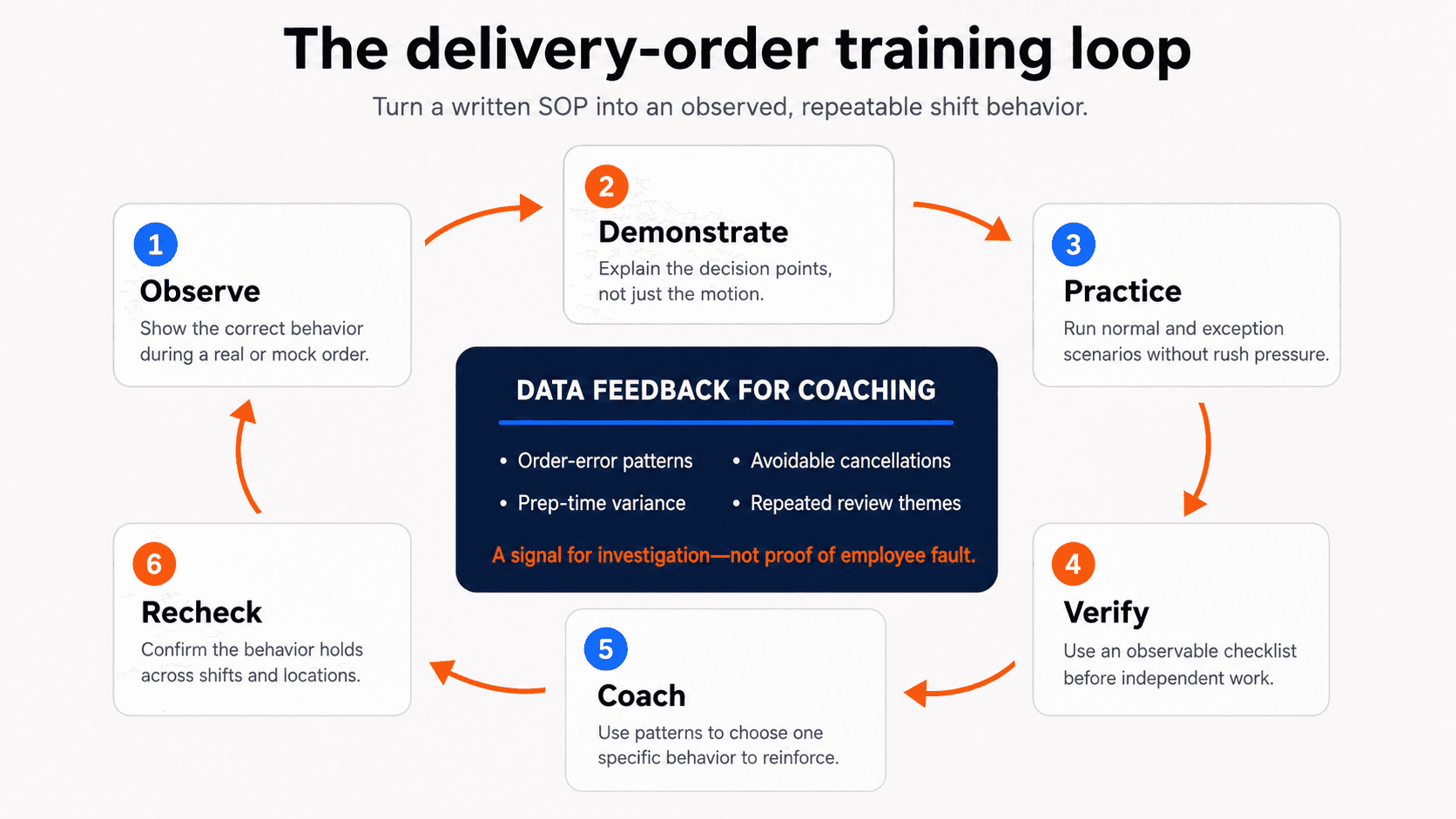
- Demonstrate, shadow, and simulate realistic orders. Include normal orders and exceptions without the pressure of a live rush.
- Require a practical competency sign-off. Have the employee perform the work while a qualified trainer observes.
- Reinforce one behavior in short pre-shift refreshers. Use a recent pattern, menu change, or seasonal issue.
- Review operational patterns and adjust the training. If the same issue continues, inspect the process, tool, menu, staffing, and training before deciding on a fix.
New York City’s playbook combines structured training, manager check-ins, and worksheets based on more than two years of lessons from over 200 trainees and 75 restaurants (source).
How can delivery data become a coaching signal?
Training decisions should not depend only on the loudest complaint or a manager’s memory.
Look for repeated patterns across a useful time range:
- Certain items appear frequently in order-error reports.
- Avoidable cancellations cluster at one location or daypart.
- Prep-time variance rises during a specific shift.
- Reviews repeat the same missing-item or packaging theme.
- Store availability drops during a recurring operating window.
These patterns point to an investigation; they do not prove employee fault. A menu mapping problem, printer failure, marketplace delay, staffing gap, packaging setup, or unclear SOP can create the same symptom. Compare data with tickets, shift notes, system changes, and direct observation before coaching or changing the process.
What should each role practice?
Use one brand standard, then assign practical checks by role.
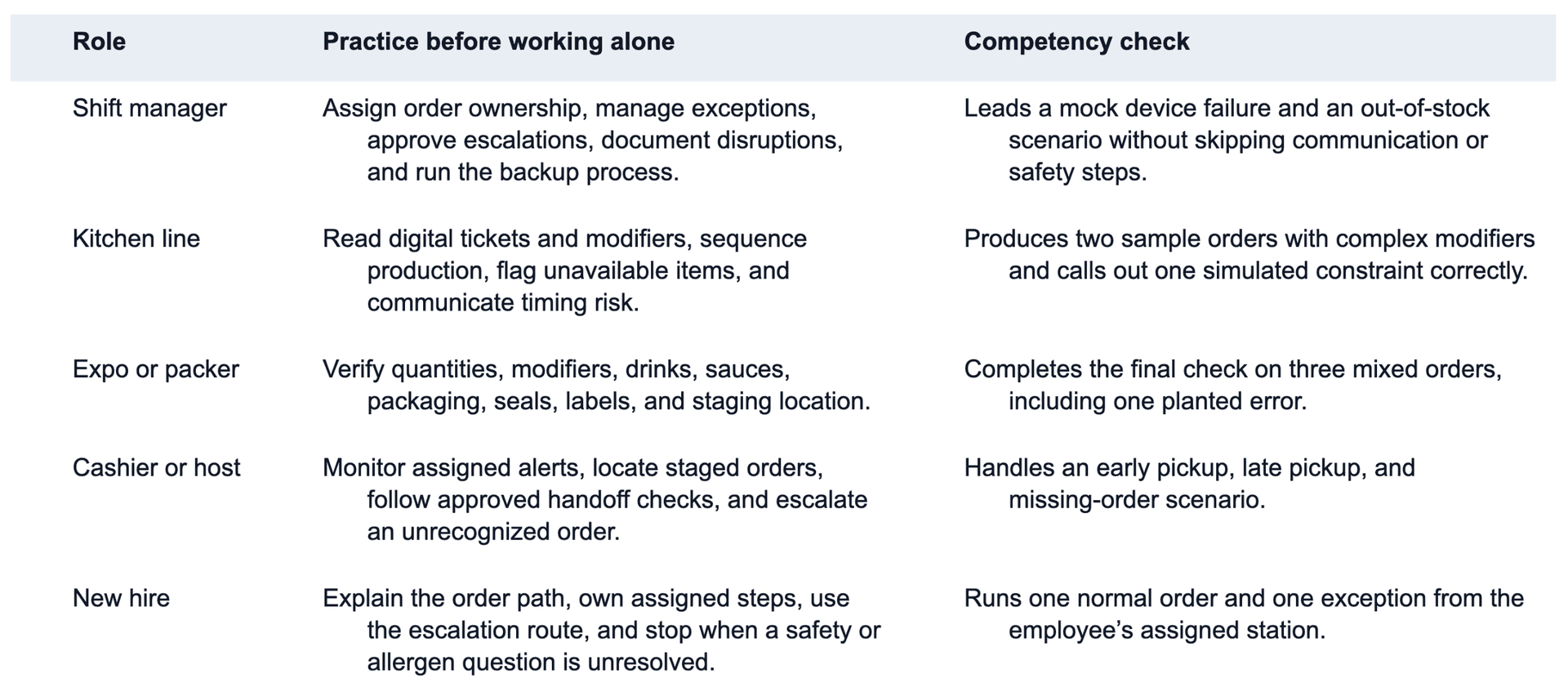
A quiz confirms recall, not performance under real conditions. Use knowledge checks and observed practice.
How can multi-unit teams standardize without ignoring local reality?
Create a core standard that every location follows:
- Common order stages and definitions.
- Required verification points.
- Approved escalation categories.
- Brand packaging and labeling rules.
- Minimum competency checks.
- Shared metric definitions.
Then add a short location appendix for local facts: station layout, device placement, pickup area, manager contacts, permitted roles, hours, channel mix, equipment, and jurisdiction-specific requirements.
Without a core standard, every manager invents a system. Without a local appendix, headquarters writes an SOP that does not fit the store. Calibrate trainers by having two managers score the same scenario; disagreement usually means the checklist is vague.
What does a 30-day rollout look like?
Week 1: Map the real process
Observe normal and rush periods. Interview staff and collect current SOPs, ticket examples, packaging rules, escalation contacts, and recent patterns. Choose the three behaviors that create the most risk when they vary.
Week 2: Build and pilot
Create role cards, practice orders, exception scenarios, and one competency checklist. Pilot with an experienced and a newer employee. Rewrite any instruction a trainer must translate verbally.
Week 3: Train and sign off
Train the trainers first, then run demonstrations, shadowing, and role simulations. Record completion through the existing training process. Attendance alone is not competency.
Before a known surge, check out [prepare for peak delivery demand] and rehearse the high-volume version of the process.
Week 4: Measure and adjust
Review sign-offs and operating patterns. Ask which exceptions remain unclear and which tools or layouts create rework. Fix the SOP or environment when the process is wrong; refresh training when the standard is clear but behavior varies.
Which metrics show whether training is working?
Use three types of measures.
Learning measures
- Percentage of assigned employees who completed the module.
- Percentage who passed the practical sign-off.
- Skills that required a second observation.
Process measures
- Final bag checks completed according to the restaurant’s method.
- Exceptions escalated through the correct route.
- Time from issue discovery to manager decision.
- Trainer calibration across locations.
Outcome measures
- Order-accuracy trend.
- Avoidable cancellation or rejection trend.
- Prep-time variance.
- Driver wait pattern, when reliable data is available.
- Repeated review themes tied to missing items, packaging, or timing.
Do not promise a universal improvement. Baselines, definitions, order mix, and conditions vary. Compare like-for-like periods and use several signals together.
How can Voosh support better coaching?
Voosh can centralize connected third-party delivery data so operators can review performance across stores and channels. Depending on the enabled modules and available source data, teams may be able to compare cancellation patterns, operational quality signals, reviews, store uptime, and other delivery performance measures.
That visibility can help a manager ask:
- Why does this issue repeat at one location?
- Is the pattern tied to a daypart, item, channel, or operating change?
- Did the problem begin after a menu, device, staffing, or process change?
- Is this a training gap, or is the system making the right behavior difficult?
Voosh does not create courses, certify employees, schedule shifts, replace manager observation, or determine fault. It gives teams a clearer operating view for investigation and coaching. Check out [centralize restaurant performance data].
Make training a weekly operating habit
The best restaurant staff training program is not the longest manual. It is the one employees can understand, practice, and repeat during a real shift.
Define the behavior, demonstrate it, practice normal and exception orders, and verify competency. Use operating patterns and observation to choose the next coaching point.
If you want a clearer view of third-party delivery performance across stores and channels, Book a Voosh demo.