What Does 86 Mean in a Restaurant? A Delivery App Guide
Summary Highlights
Learn what 86 means in a restaurant and build a fast item-availability process across delivery apps. Use the seven-step checklist to prevent cancellations.
What Does 86 Mean in a Restaurant? A Delivery App Guide
A rush is building, the last portion of salmon is gone, and the kitchen calls, “86 salmon.” Inside the restaurant, that means stop selling it. If salmon is still available on a delivery app, however, a customer can order something the kitchen cannot make.
That gap turns a two-second call into substitutions, cancellations, courier delays, and bad reviews. Here is how to control the process from shortage to restock.
In restaurant language, 86 means an item is unavailable and should no longer be sold. In delivery operations, 86ing means marking the item or modifier out of stock in the approved menu source, checking every ordering channel, handling open orders, and restoring availability only after the location is ready to fulfill it again.
What does 86 mean in restaurant terms?
To “86” a menu item means to stop selling it because the restaurant cannot or should not fulfill it. The kitchen may be out of a key ingredient, have sold the last prepared portion, or be unable to use required equipment.
The same term can also mean refusing service to a guest. In this guide, “86” refers only to item availability.
A useful 86 call answers three questions:
- What is unavailable? The full item, one modifier, or every item that uses an ingredient?
- Where is it unavailable? One location, one ordering channel, or the entire brand?
- Until when? A known restock time, the end of the day, or further notice?
“86 wings at Store 14 until tomorrow’s delivery” is actionable. “We’re out” is not.
Where did the term 86 come from?
The exact origin is disputed. The strongest historical account is that 86 appeared as restaurant shorthand in the 1930s and originally meant an item was unavailable, according to a linguist interviewed by the Associated Press. For operators, a shared definition and next step matter more than the folklore.
Why does an 86’d item cause bigger problems on delivery apps?
In the dining room, a server can tell the guest about a sold-out item before the order reaches the kitchen. Online, the order may be paid for and accepted before a team member sees the mismatch.
Off-premises ordering is routine, not occasional. In its 2025 Off-Premises Restaurant Trends report, the National Restaurant Association reported that 37% of U.S. adults order delivery at least weekly.
One stale availability setting can create several problems at once:
- The guest has to choose an alternative after placing the order.
- Staff step away from production to call the guest or support.
- The courier may wait while the restaurant resolves the exception.
- A cancellation can erase the sale and damage the guest’s confidence.
- An unapproved substitution can create an allergen or dietary risk.
What should happen the moment an item becomes unavailable?
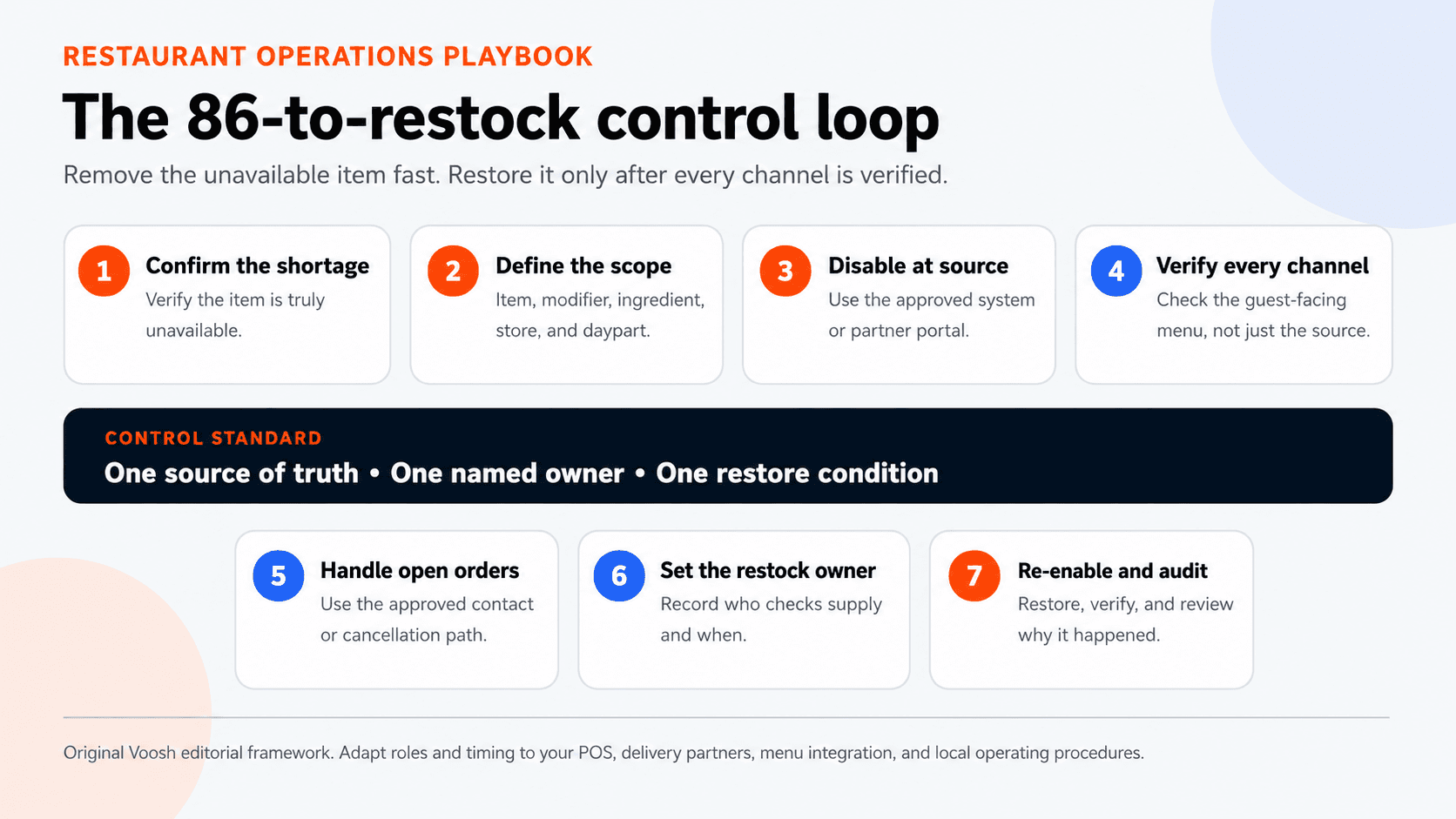
Use one standard process for every store and shift:
- Confirm the shortage. Check that the item is truly unavailable. A pan at one station may be empty while another prepared batch is ready.
- Define the affected scope. Identify the item, modifier, ingredient, store, channel, and daypart involved.
- Disable it in the approved source. Follow the workflow defined for your POS, menu integration, or delivery-partner portal.
- Verify every guest-facing channel. Open the live menu as a customer would. Do not assume that saving the source means every destination updated.
- Handle open orders. Find any accepted orders containing the item and use the approved customer-contact, adjustment, or cancellation process.
- Name a restock owner and time. Record who will check supply and when. Avoid “someone on the next shift will remember.”
- Re-enable, verify, and audit. Restore the item only when the kitchen can fulfill it, then confirm the item is live where it should be.
Current delivery documentation uses “86ing” for items and item options and recommends timely updates so guests cannot order out-of-stock choices. See the current item-status documentation.
How do you decide what exactly to 86?
The smallest correct scope protects more sales than taking a broad section offline.
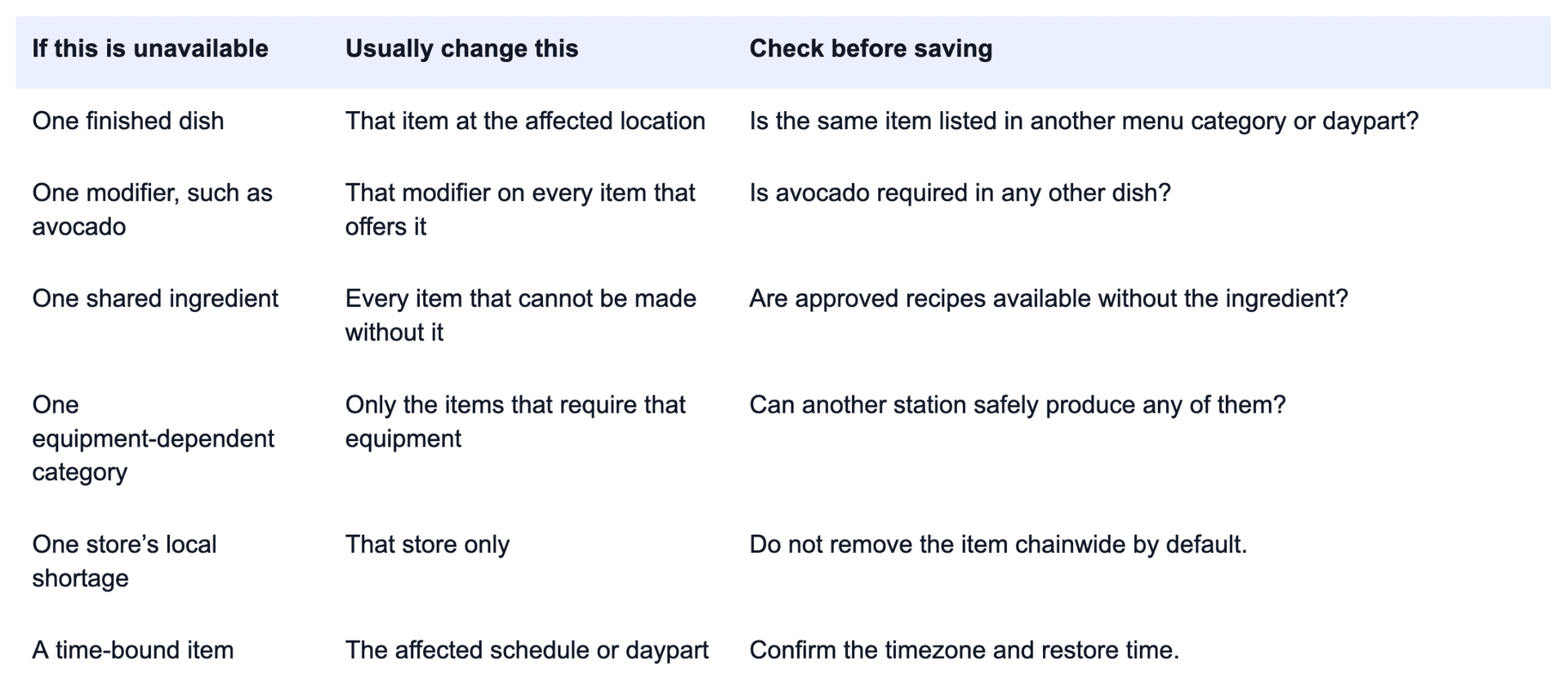
If a location runs out of brioche buns, do not automatically remove every burger. An approved alternative may work for some recipes but not others. Record the affected item or ingredient, locations, channels, time reported, expected return, and owner.
Why do 86’d items sometimes stay live online?
An item can look unavailable in one system and remain orderable somewhere else. Common causes include:
- The wrong source was updated. One integration may use the POS as its source of truth, while another requires a partner portal.
- The change has not propagated. Updates can take time or fail between systems.
- A modifier was missed. The entrée is unavailable, but an add-on or nested option still creates an impossible order.
- The wrong location was selected. Similar store names and IDs make this easy in a multi-unit account.
- The item appears in more than one menu. Lunch or late-night menus may have separate records.
- The availability window is wrong. A time-bound item may be configured incorrectly.
Treat the customer-facing menu as the final verification point. If it still shows the item, the job is not complete.
This is also a reason to run a periodic delivery app listing audit. Duplicate items, inconsistent names, and old menu sections make real-time availability changes harder to verify.
Should you substitute an unavailable item?
Use substitutions only when they are brand-approved, supported by the ordering workflow, and accepted by the guest. A replacement can change allergens, ingredients, price, or preparation.
Use this rule:
No silent swaps. If the guest cannot clearly approve the replacement, use the platform’s approved adjustment or cancellation path.
The FDA’s food safety discussion on e-commerce notes that substitutions driven by availability should not introduce allergens. Follow applicable laws and your food-safety procedures.
Build a short substitution matrix before the rush:
- Item or modifier that commonly sells out
- Allowed replacement, if any
- Price difference
- Required guest disclosure
- Allergen or dietary change
- Who can approve the substitution
If any field is unclear, do not improvise.
How should multi-unit teams manage 86ing?
The process needs local speed and central accountability. Stores must act quickly, but changes still need an owner and audit trail.
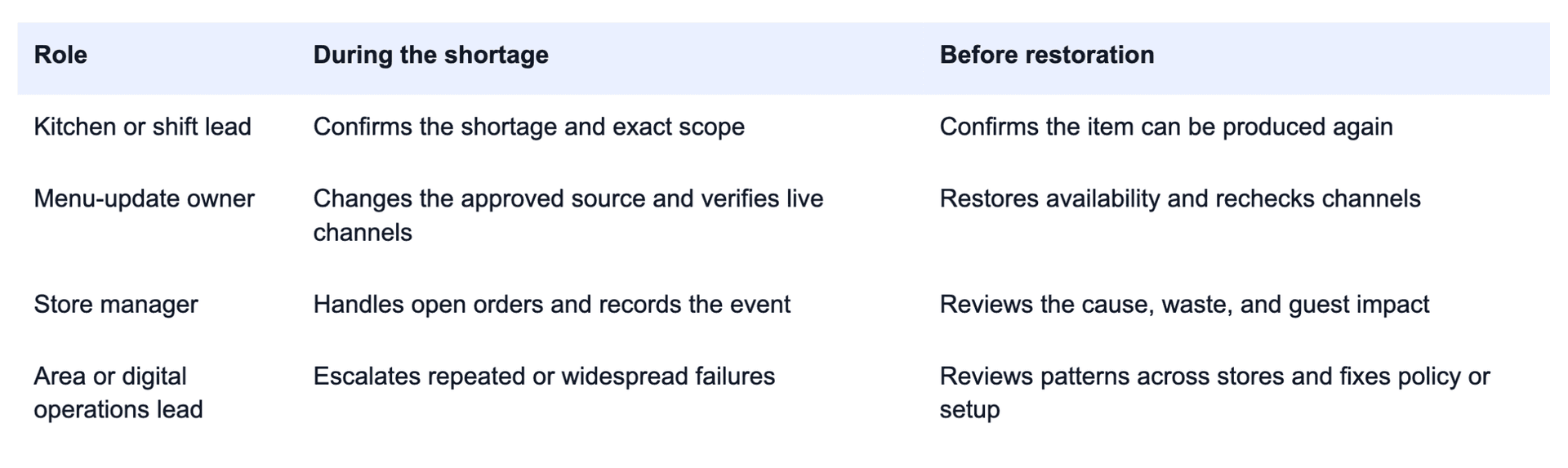
Every location should name a menu-update owner and backup for each shift. Use a specific restore condition such as “after the 10 a.m. prep count confirms 40 portions,” not “tomorrow morning.” Avoid chainwide changes unless the shortage is truly chainwide.
What should restaurant operators measure?
Start with five metrics that expose speed, accuracy, and repetition:
- Availability mismatch rate: Orders rejected or changed because an item was unavailable ÷ total delivery orders × 1,000.
- Update-to-verification time: Minutes from the confirmed shortage to the item disappearing from every intended guest-facing menu.
- Restore lag: Minutes between the kitchen being ready and the item becoming orderable again.
- Unavailable-item cancellation rate: Orders canceled for item availability ÷ orders containing the affected item.
- Repeat-86 frequency: Number of times the same item or ingredient is 86’d by store, daypart, and week.
Add review language and refund reasons where available. Establish a baseline, separate planned sellouts from unexpected shortages, and find the worst locations, items, and dayparts. A store that repeatedly 86s the same modifier at 7 p.m. has a prep or forecasting problem, not just a menu-update problem.
Improving delivery order accuracy and lowering order cancellation rate both depend on catching this pattern early.
How can delivery data prevent repeated 86s?
The 86 action usually happens in a POS, menu-management system, or delivery-partner portal. The learning happens after the shift, when operators compare the event with sales, cancellations, reviews, downtime, refunds, and store performance.
Voosh can help teams monitor downstream delivery signals and investigate patterns by brand, location, platform, date, or daypart, depending on connected data. Operators can ask:
- Did cancellations rise at the same location and hour?
- Did reviews mention an unavailable or substituted item?
- Did the store go offline after the shortage?
- Is the same location showing the pattern every week?
- Did the issue affect one marketplace or several?
Voosh does not replace inventory, POS, menu, or food-safety systems. It helps operators see what happened around the event, investigate the cause, and check whether the fix worked. See how store-level operations signals can support that review.
What can your team fix this week?
Start with one high-volume location and one week of discipline:
- Name the menu-update owner and backup for every shift.
- Document the approved source of truth for each delivery channel.
- Create a shared 86 log with item, scope, time, owner, and restore condition.
- Test one item and one modifier outside peak hours.
- Verify the result on the customer-facing menu.
- Review open-order handling with managers.
- Build approved substitution rules for the five most common shortages.
- Review the week’s cancellations and guest comments for availability language.
Compare before and after. If update time falls but cancellations do not, look for missed modifiers, duplicate menu records, or open orders. If one item keeps returning, fix the upstream forecasting, prep, vendor, recipe, or equipment issue.
“86” should be a controlled exception, not a recurring surprise. The item should be unavailable everywhere it needs to be, restored only when ready, and reviewed when the problem repeats.
Want a clearer view of the delivery signals surrounding cancellations, reviews, downtime, and store performance? Book a demo to see how Voosh helps restaurant teams investigate what is happening across third-party delivery.